
Contents
|
Update fields across linked households Review Net Worth & Revenue Calculators |
Introduction
Keeping household information up to date across many systems takes time. The integration between Tamarac CRM and Tamarac Reporting allows you to more seamlessly keep this type of information in sync and reduce potential errors.
Keeping household information up to date across many systems takes time. The integration between Tamarac CRM and Tamarac Reporting allows you to more seamlessly keep this type of information in sync and reduce potential errors.
Using the Household integration bi-directionally integrates the household name, address, and mapped custom fields between Tamarac CRM and Tamarac Reporting to reduce redundancies in data management. The Household integration additionally updates the fields in the Net Worth and Revenue calculators for all linked households.
For more information on mapping custom fields from Tamarac Reporting, see Custom Field Integration.
Before you start
To use the Household integration and sync information between households, you must:
-
Enable the Household integration in Tamarac CRM. Your firm's Data Manager must enable the integration in Tamarac Settings. For steps, see Enable Tamarac Platform Integrations.
-
Link households between Tamarac CRM and Reporting. For steps, see Household Linking.
Update fields across linked households
If you have enabled the Household integration, you can change the following fields in either Tamarac CRM or Tamarac Reporting and the change will immediately update the other system. Your households must be linked between Tamarac CRM and Tamarac Reporting to use the bi-directional integration.
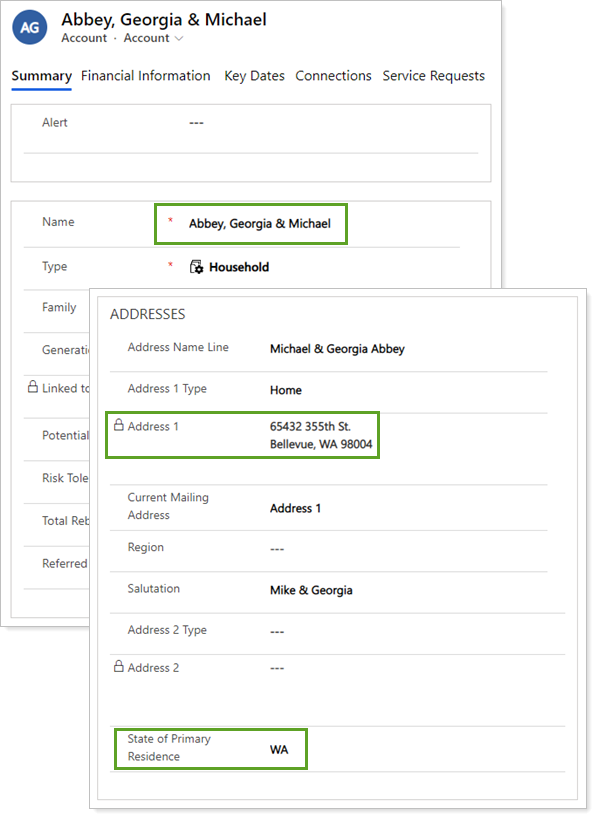
The bi-directional integration includes the following fields:
| Tamarac CRM Field | Tamarac Reporting Field |
|---|---|
| Name | Name |
| Address 1 | Address |
| State of Primary Residence | State/Province of Primary Residence |
| Mapped custom field | Mapped custom field |
Review Net Worth & Revenue Calculators
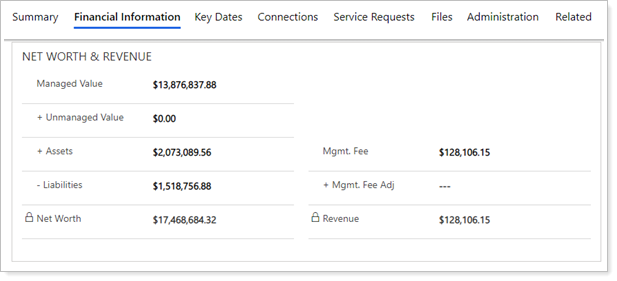
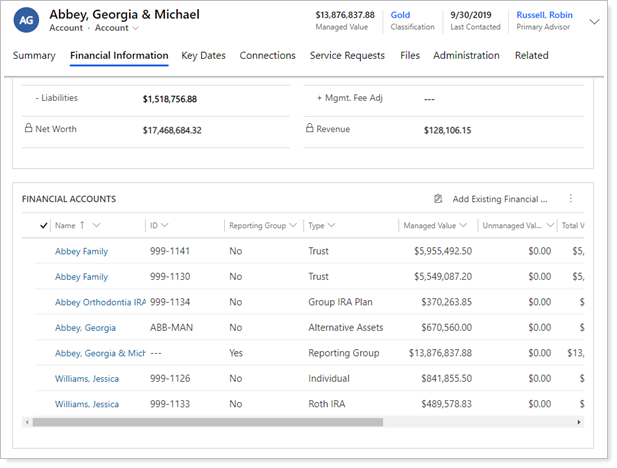
If you enable the Household integration and link a Tamarac CRM account with a Tamarac Reporting household, the integration calculates net worth and revenue information based on all financial accounts that are associated with the linked household in Reporting.
Net Worth & Revenue appears on the Financial Information tab of an account record in CRM and updates daily for linked households following the sync with Reporting.
Net Worth Calculator
If enabled, the Household integration automatically calculates and updates the following net worth fields in CRM for linked households:
-
Managed Value
-
Unmanaged Value
-
Assets
-
Liabilities
-
Net Worth
It calculates total net worth for a CRM account according to whether its associated financial accounts are linked through the Household integration:
-
For linked financial accounts: If a financial account is synced over from the Reporting household to the linked CRM account, its value is counted in the net worth only if the Include in Net Worth account setting is enabled in Reporting.
-
For unlinked financial accounts: If you manually add a financial account to a CRM account record, its value is counted in the net worth only if the Include in Net Worth financial account setting is enabled in CRM.
For more information, see Track Managed Value and Net Worth in Tamarac CRM.
Revenue Calculator
If enabled, the Household integration automatically calculates and updates the following fields in CRM for linked households:
-
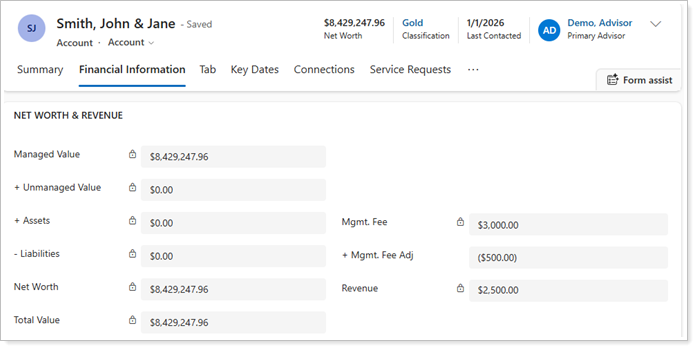
Mgmt. Fee = Sum of management fee transactions from all associated financial accounts in the linked Reporting household.
-
Revenue = Mgmt. Fee + Mgmt. Fee Adj
If needed, you can manually adjust the revenue by entering a positive or negative dollar amount in the Mgmt. Fee Adj field. This allows you to account for things like cash payments that weren’t included in revenue or sub-advisor fees that need to be subtracted from revenue.
Example
You paid out $500 in sub-advisor fees for a client and you want to exclude these fees from the revenue calculation.
Mgmt. Fee: The integration calculates total management fees of $3,000.
+Mgmt. Fee Adj: You enter –500 in the Mgmt. Fee Adj field.
=Revenue: You Save the record and the integration calculates ($3,000) + (-$500) = $2,500
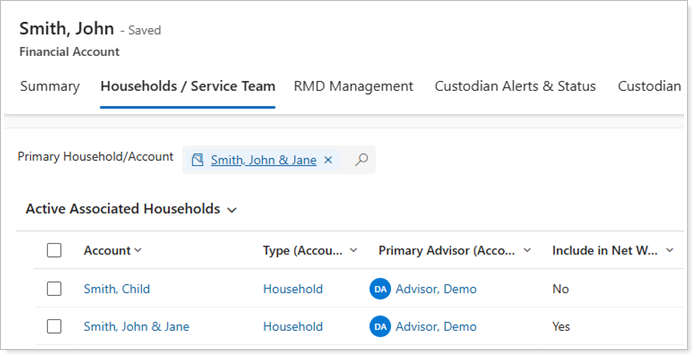
This calculation includes management fees from every financial account that’s linked from the Reporting household to the CRM account, regardless of whether the CRM account is designated as the Primary Household/Account or an additional associated household on the Household/Service Team tab of the financial account in CRM.
If you manually add a financial account to an account record in CRM, the revenue calculator won’t include that account.
For more information, see Household Linking.
Manage financial accounts and reporting groups
If you have enabled the Household integration, your settings in Tamarac Reporting will affect how your financial accounts and reporting groups are managed in Tamarac CRM.
| Action | Result |
|---|---|
| Link a household from Tamarac Reporting to Tamarac CRM | After the next sync, all financial accounts and reporting groups in Tamarac Reporting associated with the linked household will be associated to the Tamarac CRM account. |
| Remove a household link in Tamarac Reporting | The financial accounts and reporting groups for that household will remain associated to their Tamarac CRM account. |
| Add/remove accounts for a linked household in Tamarac Reporting | After the next sync, the Tamarac CRM account linked to the household will show any financial accounts you added and will not show financial accounts you removed. |
| Remove groups from a linked household in Tamarac Reporting | After the next sync, the group will be removed from the Tamarac CRM account that was linked to the Tamarac Reporting household. Accounts that were indirect members of the household through the removed group will be removed from the household unless they also had direct membership with the household. |
| Delete a linked household in Tamarac Reporting | Accounts in Tamarac CRM retain their associations with financial accounts and reporting groups. Nothing is deleted in Tamarac CRM. |
| Set a linked household as Primary in Tamarac Reporting |
After sync, financial account or reporting group associations will be updated for any linked Households. This populates the Primary Account/Household field with the selected household for the financial account or reporting group in Tamarac CRM. |
See Financial Account Integration for more detailed information on membership and data syncing.
Contextually open households in Reporting
From Tamarac CRM, you can easily access more information about the household in Tamarac Reporting by using the Open in Tamarac feature on the command bar of account records.
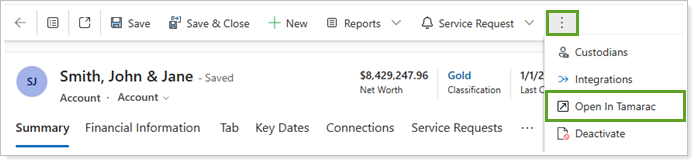
When you select Open in Tamarac in CRM, Tamarac Reporting automatically opens the household page and uses contextual linking to display the most relevant data:
-
If the household is linked between Tamarac CRM and Tamarac Reporting, the household page opens with the slide out open for the selected household in a new tab.
-
If the household is not linked between Tamarac CRM and Tamarac Reporting, the household page opens in a new tab.