
[Draft] Internal Article: Goldman Sachs Data Feed Setup
QUESTION
How do I set up a data feed from Goldman Sachs?
ANSWER
Tamarac Advisor Services often assists clients with requests to enable a particular custodian feed to PortfolioCenter or the UMP.
| UMP (Y/N) | TAM Recommended | PC (Y/N) | Login (Y/N) | Frequency (D/W/M/N) | UMP Quality (1-4) | PC Quality (1-4) | Cost Basis (D/W/M/N) | CFR Contact |
| Y | N | N | D | 3 | None | YES |
Instructions
To set up a data feed in the UMP from Goldman Sachs, follow these steps:
- Ask the client to complete the Goldman Sachs Letter of Authorization (LOA) and return it to you. The following information may help the client complete the LOA:
- Goldman Sachs requires the end client's signature.
- On page one, checking the Authorization applies to all current and future accounts with the same account names as used in this document box means that new accounts with the same name will not require a new LOA.

However, these accounts will not automatically be added to the feed. To add a new account with the same name as an existing account, send an email request to Goldman Sachs (gs-pwm-external-feed-requests@ny.email.gs.com) including the account name and all new account numbers. - In paragraph 1.1, write Envestnet Asset Management Inc. & [Client Firm Name]

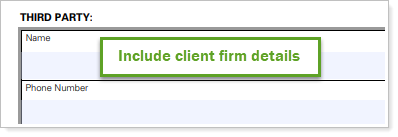
- On page two, under Third Party, include the client firm's information.
- If multiple accounts have the same account name and authorized signatory, you can write "see attached" in the Account Number box on page one. Then attach a list of the additional account numbers signed and dated by the authorized signatory (printed name and signature).

Note:
In this LOA, the third party is the FIRM NAME and not Envestnet Tamarac.
-
Once the client has returned the completed LOA, open a new ticket in Zendesk.
-
Set yourself as the assignee.
-
Attach the LOA and send the ticket to gs-pwm-external-feed-requests@ny.email.gs.com. See the sample message below:
Sample Email:
[To]:gs-pwm-external-feed-requests@ny.email.gs.com
[Subject Line]:Envestnet Tamarac Feed for {Firm Name}
[Email Content]
Hello Goldman Sachs team,
Can you please add this account in the LOA, The link is included within this email, to our Goldman Sachs Envestnet feed? This is a new feed for {Firm Name}.
If you could please let me know when this has been completed, it would be greatly appreciated. Please note that the file is not attached but is a link within this email. Let me know if you have any questions.
Regards,
Your Name
-
When Goldman Sachs confirms they have processed the LOA, notify the UMP Configuration team so they can claim the accounts (Macro: UMP Manual Claim Request)
Sample Message:
Hello UMP Team,
Please claim the below accounts to the firm XXXX:
Firm Name as it exactly appears in UMP:
TAS Number associated with this Firm:
Accounts Numbers: (if more than 10 please attach a spreadsheet)Thank you,
- When the UMP team confirms the exporter set-up (for new feeds) and the feed is flowing, contact the PCR team to reconcile and post accounts.The PCR team is also responsible for creating the interface for new data feeds.
APPLIES TO
- Tamarac Services