
QUESTION
How do I set up a data feed from BNY Mellon?
ANSWER
Tamarac Advisor Services often assists clients with requests to enable a particular custodian feed to PortfolioCenter or the UMP.
| UMP (Y/N) | TAM Recommended | PC (Y/N) | Login (Y/N) | Frequency (D/W/M/N) | UMP Quality (1-4) | PC Quality (1-4) | Cost Basis (D/W/M/N) | CFR Contact |
|---|---|---|---|---|---|---|---|---|
| Y | N | N | N | D | 3 | YES |
Note
We retrieve data files from the Bank of New York FTP site.
PortfolioCenter Data Feed
To set up the PortfolioCenter data feed from BNY Mellon, the process comprises these steps:
-
The client should reach out to their BNY Mellon rep and request that Tamarac have access to their data, in the form of daily PortfolioCenter/Centerpiece compatible files. The client should also provide the custodian with the name of their Tamarac contact.
-
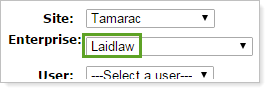
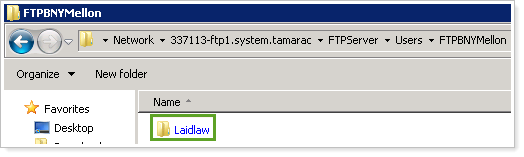
While the client is submitting the request, create a new folder in the FTP. The folder name must match the client's Enterprise name in TamTerminal:
-
When the custodian contacts you, tell them the name of the directory you have created.
UMP Data Feed
To set up the data feed in the UMP from BNY Mellon, the process consists of these steps:
-
Have the client contact their BNY Mellon account administrator and inform them that they want their accounts to come through the Envestnet platform (Mailbox ID T5V).
-
Then the BNY Mellon administrator should follow all internal steps including setting up an FTP ID. For additional assistance, the BNY Mellon administrator can contact Michael Kelly or Paul Cuadrado at BNY Mellon who have previously assisted in setting up Envestnet feeds for Tamarac clients.
- Michael Kelly michael.kelly@bnymellon.com
- Paul Cuadrado paul.cuadrado@bnymellon.com
-
Once the feed or account has been confirmed, check with TAS-UMP-Configuration.
APPLIES TO
- Tamarac Services