
QUESTION
How do I set up a data feed from PNC?
ANSWER
Tamarac Services often assists clients with requests to enable a particular custodian feed to PortfolioCenter.
To set up the data feed from PNC, the process consists of these steps:
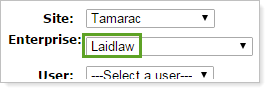
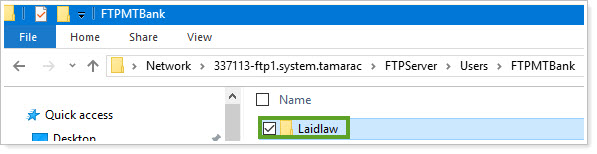
- Create a new folder in the PNC FTP. The folder name must match the client's Enterprise name in TamTerminal:
- Send an email to PNC (PNC.AMG.Extracts@pnc.com) requesting that Tamarac receive data. Use the following template:
TO: PNC.AMG.Extracts@pnc.com
SUBJECT: PNC Feed for Tamarac - <Client Firm Name><Client Firm Name> wants Tamarac (partnercode: TAMAENV) to start receiving their data in the form of daily PortfolioCenter/Centerpiece compatible files. Please push these files to the directory titled <FTPPNC Folder Name (Client Name)> in the already established FTP.
The primary contact is <Primary Contact Name>:
- email address
- phone number
- list of account numbers
- firm code (The firm will need to provide you with their PNC firm code)
Note:
If full account numbers are required, send a password protected excel sheet with the password provided via phone call and separate request.
If you have any additional questions regarding status or issues with data feed setup, you can contact catherine.roos@pnc.com at PNC.
APPLIES TO
- Tamarac Services