
QUESTION
How do I set up a data feed from Union Bank?
ANSWER
Tamarac often assists clients with requests to enable a particular custodian feed to PortfolioCenter.
To set up the data feed from Union Bank, the process consists of these steps:
- The client should reach out to their Union Bank rep and request that Tamarac have access to their data, in the form of daily PortfolioCenter/Centerpiece-compatible files. The client should also provide the custodian with the name of their Tamarac contact.
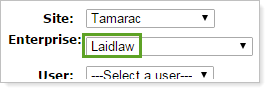
- While the client is submitting the request, create a new folder in the FTP site. The folder name must match the client's Enterprise name in TamTerminal:
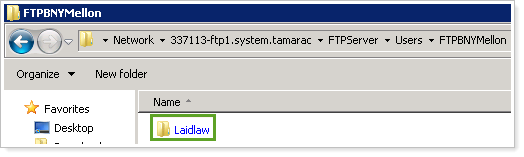
- When the custodian contacts you, tell them the name of the directory you have created.
APPLIES TO
- Tamarac Services