
Contents
Report Studio Updates
Manage shared access for reports, sections, and modules in Report Studio
Report Studio now gives you more control over who can see shared content. When you make a report, section, or module public, you can choose exactly who can access it. If you have the appropriate permissions, you’ll see a new Manage access link when you select Mark as publicly accessible.
This feature lets you share access with certain Resource Sets, user groups, or individual people. You can create Resource sets in Report Studio, while users and user groups are managed outside of it. You can change access while editing a report, section, or module, or from the main Report Studio page. This makes it easy review and update sharing settings whenever you need.
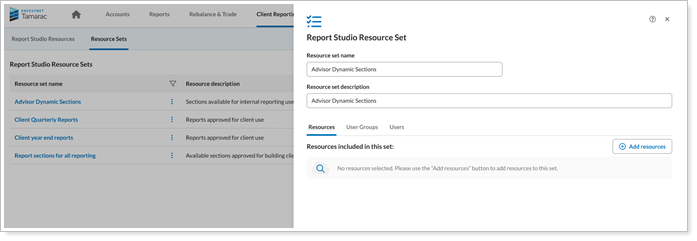
See Manage Shared Access to Reports, Sections and Modules in Report Studio for more information.
Client Portal Updates
News page in the Client Portal
The Client Portal now offers a configurable News page powered by RSS feeds, accessible from the left navigation pane. You view curated articles with enhanced reliability, and the portal provides clear error messages for invalid feeds.
The News page displays RSS feed groups as tabs. Each group shows up to 100 articles, sorted by the newest first. Selecting Read more opens the article in a right-side flyout, and the layout adapts to desktop, tablet, and mobile devices.
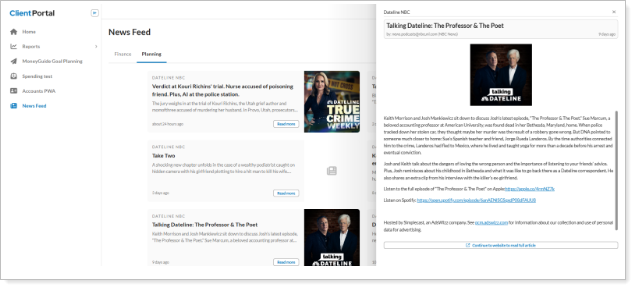
This update increases News page reliability through robust error handling. If a feed is invalid or unavailable, the system displays clear messages. When administrators add a new RSS feed, Configuration Management checks the feed and warns them if the URL does not work or contains no articles.
See Add a news page to the Client Portal for more information.
New Bond Analysis Bar Chart Widget
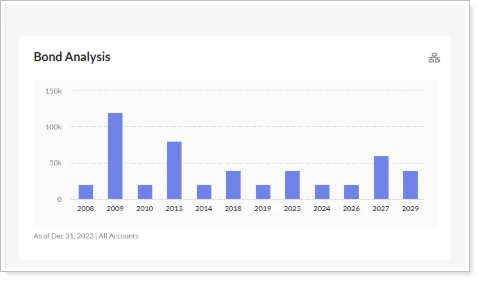
The Unified Client Portal now includes the Bond Analysis Bar Chart widget, which shows bond maturities by year. You can customize the chart title, and the widget updates automatically as data changes.
The widget also lets you set an as-of-date and integrates with the reporting platform to show your selected security types, accounts, and dates. Use the dropdown menu to filter bond maturities by account. The widget is fully responsive and displays consistently on any supported device.
See Add and remove widgets on a dashboard in a Reports template for details.
See MoneyGuide upcoming goals in the Client Portal
The new Upcoming MoneyGuide Goals widget is now available on the Home page. This configurable widget enables clients to view upcoming goal events, enhancing the visibility and accessibility of their MoneyGuide plans.
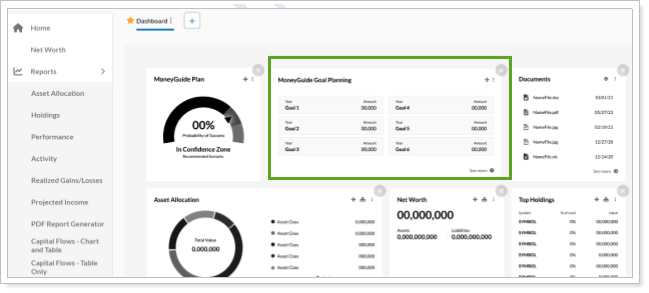
Clients can add the widget to pre-built dashboards or include it on their own dashboards. The widget displays up to six upcoming goals useing data pulled from MoneyGuide, including:
-
Year – When the goal occurs
-
Amount – The goal amount for that year
-
Name – The goal’s title
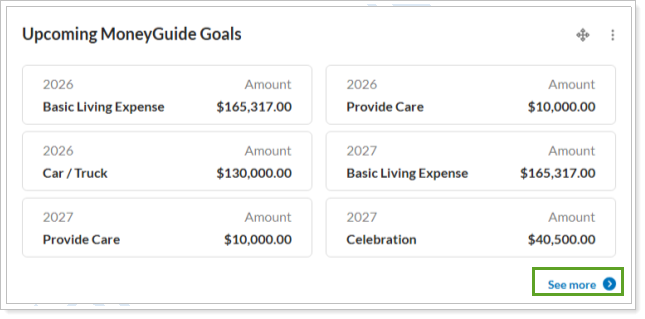
To view more details, you can select the link in the widget to open the MoneyGuide Goal Planning page. Selecting See more displays additional goals beyond the initial list.
We have also enhanced the MoneyGuide Goal Planning page. Instead of showing extra goal details in a popover, the page now displays all goal information directly on the page, making it easier to review information at a glance. The redesigned page delivers improved responsiveness and provides a better experience on mobile devices.
Bulk document upload and download for the Client Portal
If your clients need to send or receive statements, tax documents, or onboarding materials, bulk actions make the process faster. Bulk actions organize document exchanges and reduce back-and-forth, especially when your clients handle multiple files.
With this release, clients can upload or download multiple documents at one time in the Client Portal.
The following limits apply:
| Action | Maximum Number of Files |
|---|---|
| Upload | 10 |
| Download | 50 files in one ZIP file |
Upload
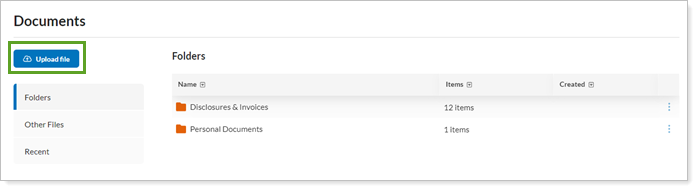
Instead of uploading files one by one, clients can upload multiple files in a single step.
Download
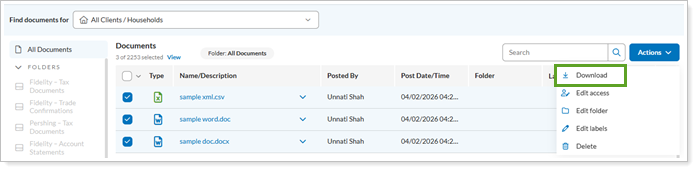
Clients can download several documents together, making it easier to save files for offline use or keep records. This feature simplifies moving documents into and out of the Document Vault and provides clear validation and feedback.
Validation
This update also brings enhanced file verification for uploads within the Client Portal. If a file contains restricted characters, the system now gives a clearer error message explaining the cause of the upload problem.
See Post Documents, Reports, and Other Files to Client Portal for more information.
New columns for the Summary report and widget
The Summary report and widget form a cornerstone of your client portal reporting package. To give clients a more detailed view of their key financial metrics, this release introduces additional columns to the Summary report and widget. These updates give a clearer view of both managed and unmanaged assets, helping clients track their finances and plan effectively.
About 30 new columns have been added across these categories, with each including unmanaged and total:
The added columns for unmanaged assets clearly match the existing ones for their managed counterpart in the report. To choose to show or hide details about intra-group money movements, clients can turn on or off the Include intra-group flows setting.
System Settings Updates
Expanded password expiration controls and notifications
To help keep your client data safe, anyone accessing the platform must periodically change their password. In the past, password expiration was either inconsistently enforced or surfaced too late, leaving you unexpectedly locked out. You didn’t know when action was required, and firm admins had limited ways to enforce firm standards without creating friction.
With this release, passwords will expire on a firm‑defined schedule of up to 180 days, with clear, predictable notifications leading up to the expiration date. Starting 10 days before expiration, you'll see a once‑per‑day reminder at sign-in prompting you to reset their password or defer for a day.
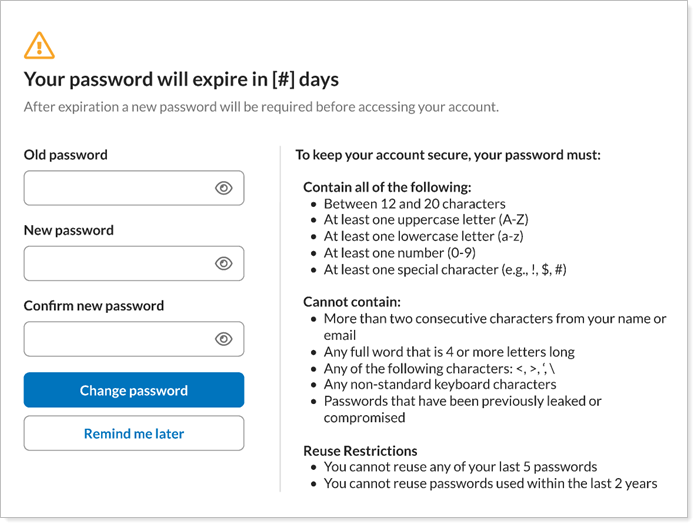
Once a password expires, the prompt becomes blocking. You’ll have to reset your password to sign in. This ensures security policies are enforced consistently while giving you ample warning and a clear path to resolution.
Your firm can customize the desired expiration interval on System Settings under User Security.
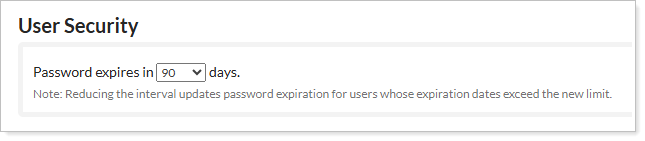
For more information, see Customize the password expiration interval.
Expanded session timeout controls and notifications
We know how important security and user experience is to you and your clients. With this release, you can now configure session timeout limits for advisors and users to protect accounts while maintaining convenient access.
Tamarac now has the following session timeouts:
-
Clients: Sessions expire after a minimum of five minutes or a maximum of 60 minutes.
-
Advisors: Sessions expire after a minimum of five minutes or a maximum of 90 minutes.
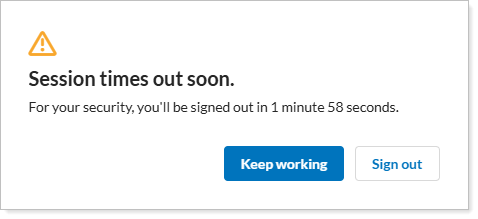
Alongside these improvements, a new notification alerts you before your session expires. Users can extend their session directly from the notification if they are still active.
Session times out soon
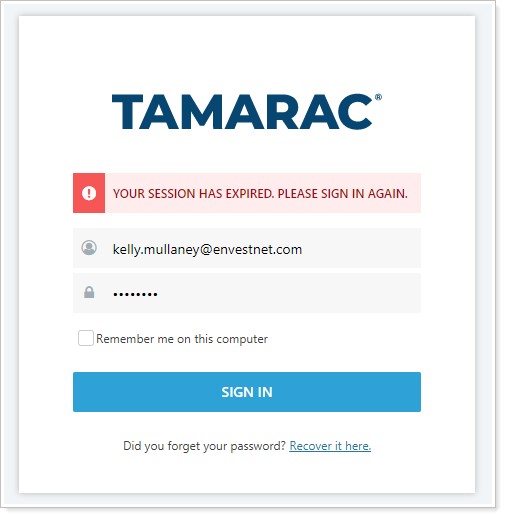
Session timed out
For details see Session Timeouts.