
Contents
Integrations
New MoneyGuide Overview page
For those firms that use MoneyGuide, Tamarac Reporting now includes a new MoneyGuide Overview page. You can use this page to see a real-time summary of a client’s financial plan without leaving Tamarac. This helps you see key plan information faster during client conversations and account reviews.
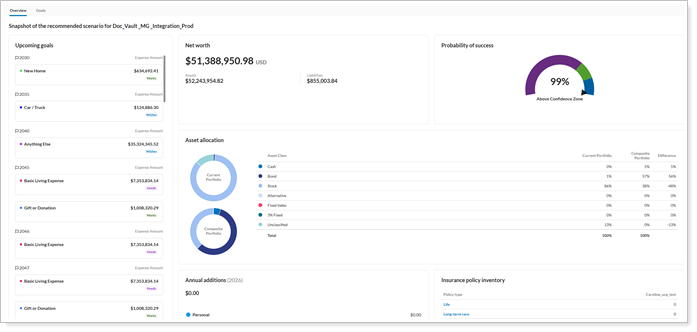
The new Overview page is the starting point for the enhanced MoneyGuide experience. It brings together key plan details so you can more quickly review a client’s financial position. From this page, you can:
-
View the probability of success.
-
Review household and plan details.
The page also helps you identify missing data, like when a household doesn’t have a plan, an account isn’t linked to a household, or plan data isn’t available. Tamarac receives plan data in real time from MoneyGuide. This gives you faster access to important plan information in Tamarac.
Notes
Your firm must have the MoneyGuide integration enabled to see the Overview page.
To access the MoneyGuide Overview page, select  next to the household and select View MoneyGuide Dashboard.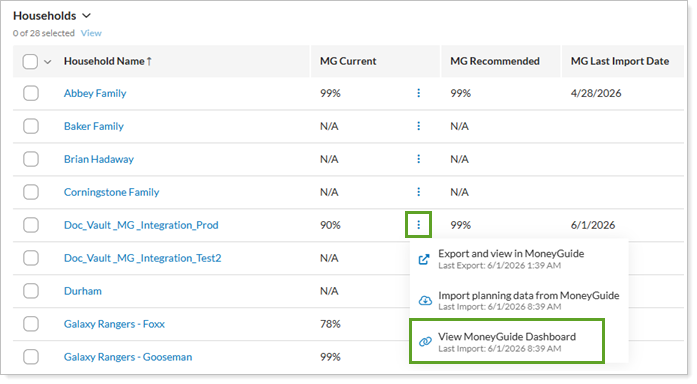
For more information, see INSERT LINK HERE
New MoneyGuide Goals page
For firms that use the MoneyGuide integration, when viewing goals, you’ve always had to open MoneyGuide separately from Tamarac Reporting. This slows you down as you switch between platforms. With this release, you can now save time by viewing a client’s financial planning goals in Tamarac Reporting on a dedicated Goals page. The page shows goal data in real time, including funding status, amounts, time horizon, and priority.
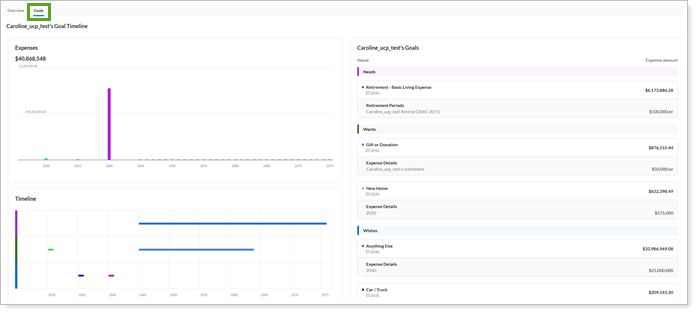
Tamarac Reporting also shows clear messages when goal data is unavailable, such as when a household has no plan with goals, an account is not part of a household, or goal data is missing, incomplete, or unavailable.
To access the Goals page, select the Goals tab on the MoneyGuide dashboard.
Notes
Your firm must have the MoneyGuide integration enabled to see the Goals page.
For more information, see INSERT LINK HERE
See Canoe tax documents in the Tamarac document vault
If you use alternative investments, you know that getting access to tax documents takes time. In the past, you had to sign in to each separate alternative investment provider’s site to download those files. This created extra steps for both you and your clients, taking time and creating frustrating roadblocks.
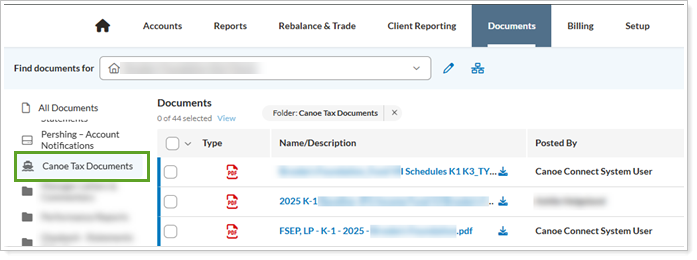
With this release, the Tamarac platform connects directly to Canoe, a leading provider for alternative investment data. This integration lets you to directly access tax documents associated with private-placement alternative investments, such as K-1s and 1099s, in the Tamarac document vault. This helps simplify your workflow and keep your documents organized.
If your firm has the Canoe integration enabled, you can find these documents in the Tamarac document vault under Canoe Tax Documents:
Notes
Your firm must have the Canoe integration enabled to see the Canoe Tax Documents folder. To turn it on, contact your Tamarac Service team.
For more information about the document vault, see Use the Document Vault.
For more information about seeing tax documents from Canoe in Tamarac, see Canoe Integration.
Client Portal updates
See the MoneyGuide Plan Summary in the Client Portal
The Client Portal now includes the MoneyGuide Plan Summary page, which gives clients one place to view their financial plan and compare current and recommended scenarios. Clients can review retirement, goals, savings, portfolios, investments, and Social Security side by side to better understand their options and make informed decisions.
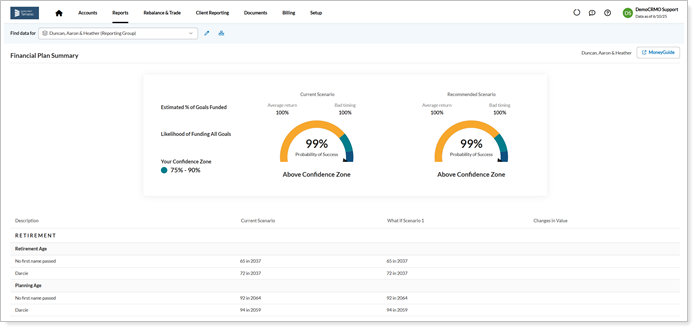
Some features of the Plan Summary page include:
-
Success meters and comparison views. See how their plan is performing.
-
Expandable sections. Make it easy to explore more details about goals, savings, portfolios, investments, and Social Security when needed.
-
Changes in Value column. Show how recommended updates may affect the plan.
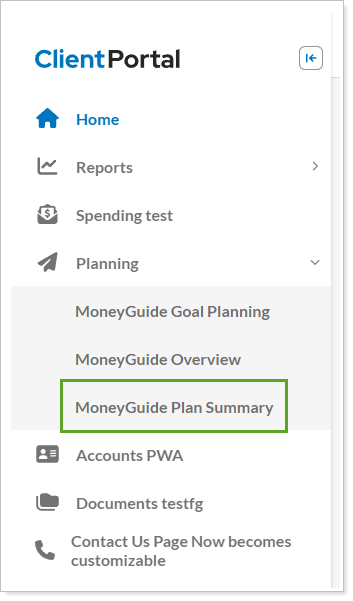
To see the MoneyGuide Plan Summary in the client portal, select MoneyGuide Plan Summary under Planning.
Notes
You must enable Plan Summary and Goal Planning to access the MoneyGuide Plan Summary. See Customize New Client Portal Pages and Reports for more information.
Report Studio updates
Calculate Committed Capital data using custodian transactions
Tracking alternative investment data with manual security snapshots can be inefficient and time-consuming. Based on your feedback, Report Studio can now automatically calculate committed capital data using custodian transactions. This enhancement reduces manual work, simplifies your workflows, and increases efficiency when working with alternative investment data. As part of this update, the Include committed capital data in Report Studio option is no longer required.
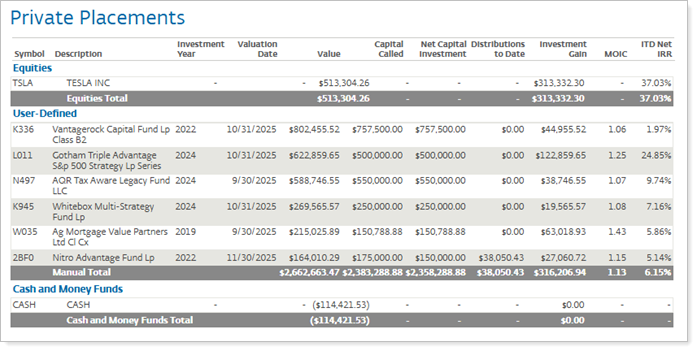
This feature will be available for the following security types:
-
Equity
-
Mutual Fund
-
Unit Trust
-
User Defined
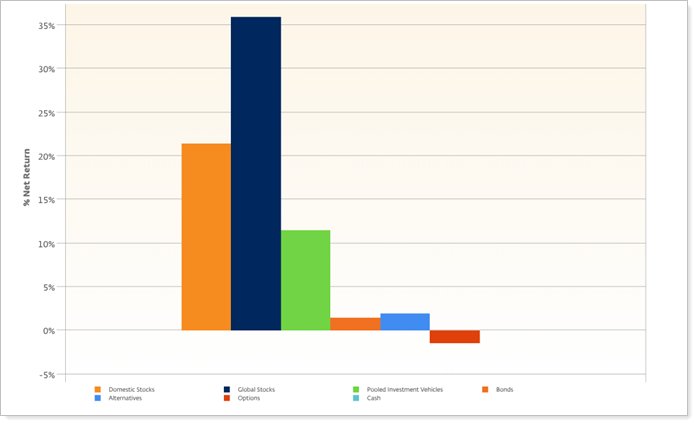
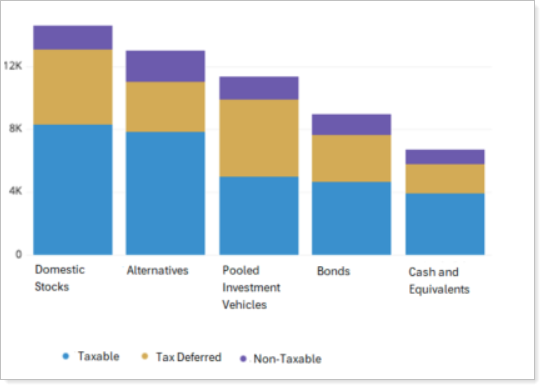
New bar and line chart module
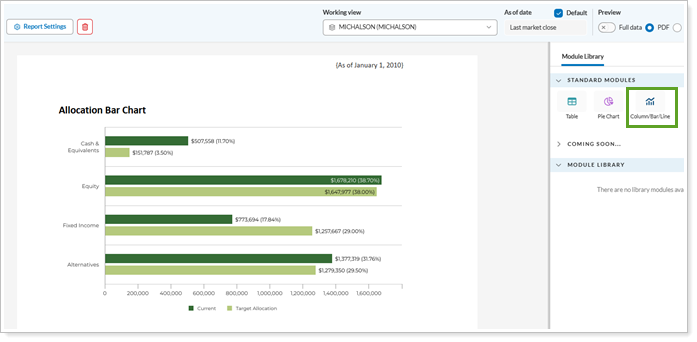
Polished visual reports help make client reviews more effective. Bar and line charts turn complex data into clear visuals that clients can understand quickly. With this release, we’re introducing a new Bar and Line Chart module in Report Studio. The module brings existing Tamarac bar and line chart types into Report Studio so you can keep working with familiar visualizations in a more streamlined experience. Use these charts to compare balances and allocations across portfolios, visualize changes over time, identify outliers or shifts in performance, and create more refined client-facing reports. These enhancements give you more flexibility and deeper insight when you visualize data in Report Studio.
Performance by category
Asset allocation by location
For details see Using the Column/Bar/Line module.
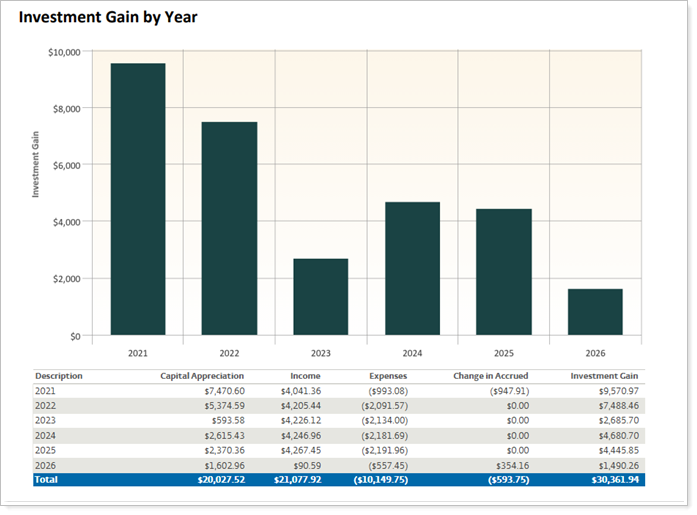
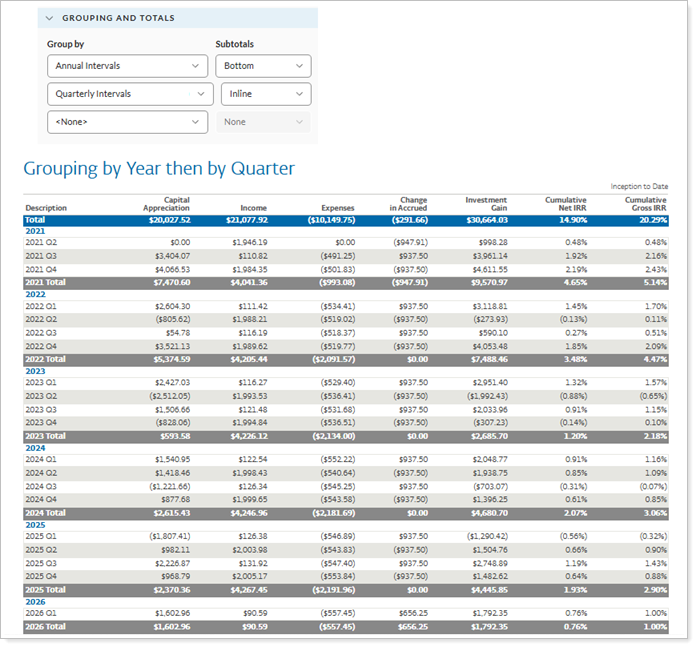
New interval grouping options for tables and charts
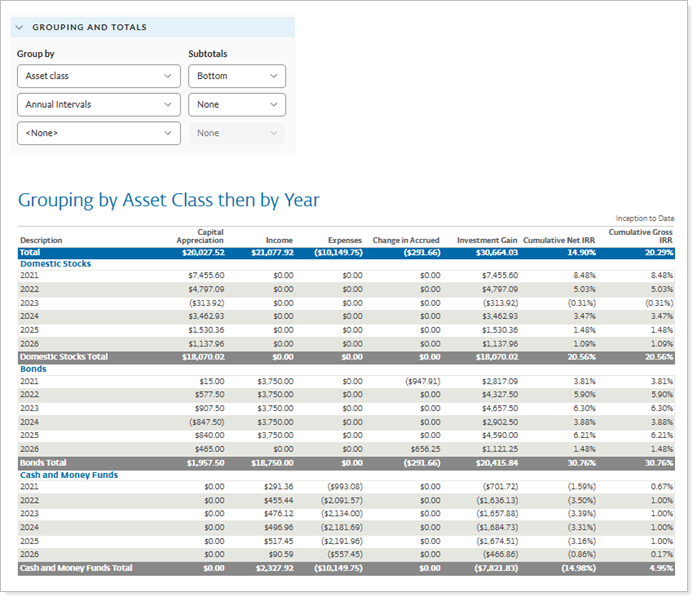
We know it’s important to show your clients how their portfolios perform during specific time periods. With this update, Report Studio makes it easier by offering new grouping options for tables and charts. You can now organize data by yearly, quarterly, or monthly intervals—plus combine different grouping methods in bar charts and tables. This means you can create clear, visually appealing reports that highlight time-based performance for client meetings, help you identify trends, and meet compliance requirements. Report Studio includes all these features, eliminating the need for extra reporting tools and simplifying your workflow.
The new grouping options are:
-
Yearly intervals
-
Quarterly intervals
-
Monthly intervals
Grouped by Annual intervals
Grouped by Annual then Quarterly intervals
Grouped by Asset Class then by Annual interval
Performance enhancements
Simplified Household permissions
As part of our ongoing effort to simplify your platform administration and speed up your Tamarac platform experience, we're updating how Tamarac displays empty Households. In the past, you controlled who saw Households that have no accounts with the Empty household visibility user permission. Now, we're replacing this permission with logic to control who sees empty Households.
After this release, you'll see Households that have no accounts only if at least one of the following conditions are true:
-
You have access to the All Accounts account set.
-
You created the Household.
-
You're assigned as the client administrator for a member of the Household.
For more information, see See a Household.
Updated sign-in experience
What's changing
If you sign in to the Tamarac platform directly, you’ll notice a redesigned sign-in experience with a clean, modern look that matches the rest of the Tamarac platform. Updated colors, typography, and layout provide a more consistent experience, while the site responsively adapt to work seamlessly on desktop, tablet, or mobile devices.
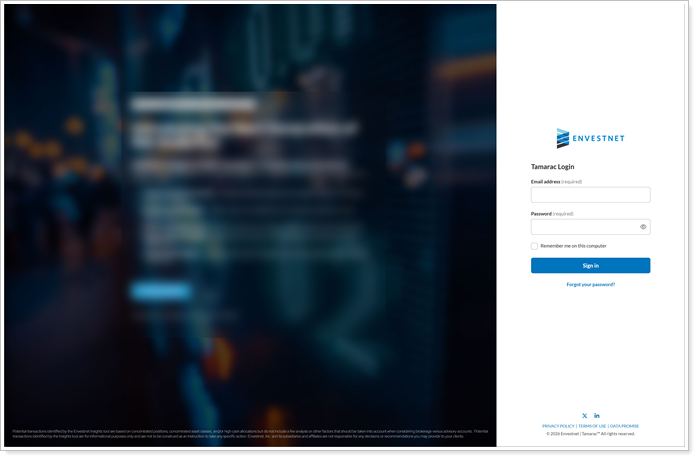
This change applies to:
-
Advisors. See the change when signing directly into the Tamarac platform. If you use single sign-on (SSO) to access the Tamarac platform, this change won’t impact you.
-
Clients. See the change when signing into the client portal.
Why you'd use it
The updated sign-in experience provides a smoother and more polished sign-in experience for you and your clients. Clearer error messages make it easier to know what to do if something goes wrong, improved color contrast and keyboard navigation support improve accessibility, and the consistent design reinforces trust in the platform from the moment you arrive.
How to get started
These updates are applied automatically. You’ll see the change next time you sign in.
There is no change to your username or password. Only the look and feel are updated.