
Contents
|
Customize the Previous Date Period Types When Used at the End of a Date Period Better Align Date Periods Between Client Statements and Client Portals |
Customize the Previous Date Period Types When Used at the End of a Date Period
The previous date period types (Previous, Inception to Previous, and Previous to Previous) let you define a date period relative to today. However, we heard your feedback that you were getting unexpected results when using a previous date period type at times that fall at the end of that date period range. If you were to run a report at year end, you may notice that the Previous 1 Year(s) and Year to Date date period would produce the same results. If today is the last day of 2019, you may want that date period to be 2018, not 2019.
Because of this, we added an additional way to customize how the previous date period types are calculated with the Always use previous period option.
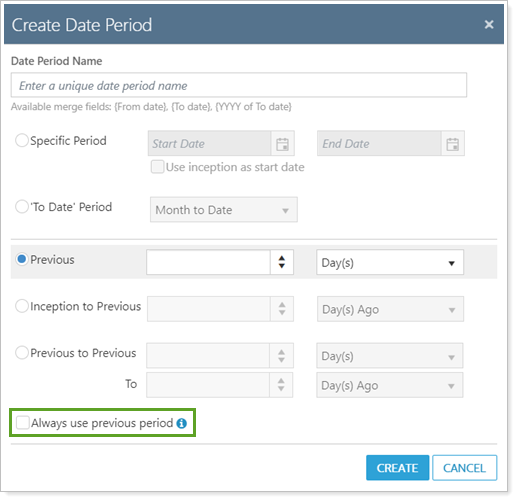
This setting lets you define the date period as always the period of time previous to the one you're in, even at the end of the period.
Example
Today's as of date is December 31, 2019 (12/31/2019) and you are running a report using the Previous 1 Year(s) date period.

If you select Always use Previous Period, the resulting date period on this report would be 2018.

If you clear Always use Previous Period, the resulting date period on this report would be 2019.

|
Scenario: You run a Previous 1 year(s) date period on 12/31/2019
|
|
|---|---|
| Option status | Expected results |
|
Selected |
With Always use previous period selected, the date period would be 2019. |
|
Cleared |
With Always use previous period cleared, the date period would be 2020. |
This option lets you further customize date period behavior and eliminates confusion, especially when you use a date period at the end of that defined period of time.
This doesn't impact days at all, mostly applies to year, quarter, and month end dates
Better Align Date Periods Between Client Statements and Client Portals
We know clear and consistent communication with clients is an important part of any firm's practice and we heard your feedback about inconsistencies between the date periods clients see on their quarterly statements and the dates they see in client portals. Clients could be confused if they're expecting to see one consistent date range in both places.
With this release, we added new date period options to help you communicate date periods more consistently to match the dates shown on quarterly statements and the dates shown on other reports in Tamarac Reporting, including reports on client portals. We added the following new options when setting up 'To Date' Period:
- Quarter to Month End
- Year to Month End
- Year to Quarter End
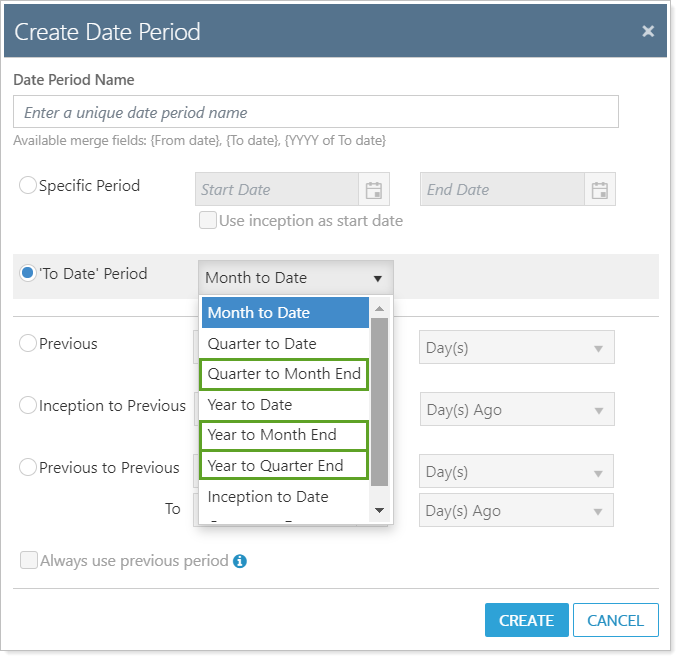
These options close the gap between date periods that stay current relative to today's date and date periods that reflect a client's last quarterly statement. These date period options use the following logic:
| 'To Date' period option | Description of Date Period | Expected output |
|---|---|---|
| Quarter to Month End | Begins as the beginning of the quarter and ends at the end of the previous month |
|
| Year to Month End | Begins at the beginning of the year and ends at the previous month |
|
| Year to Quarter End | Begins at the beginning of the year and ends at the previous quarter end |
|
count back to the last quarter end and count back; update should be in test2 monday
Platform Improvements & Performance Enhancements
Part of our ongoing effort to improve the speed and reliability of the Tamarac Platform includes a number of enhancements under the hood. This table highlights improvement made since our last release:
| improvement made | type of improvement |
|---|---|
|
From Gauri TUFF-2518 We improved the way we process reporting requests when using Tamarac Reporting by reducing database calls and improving calculation processing. In some cases, this improved reporting request time by 10%.
|
Code/Database |
|
From Gauri TUFF-2416 We added a load balancer tool to help evenly balance requests and improves performance for those clients who were experiencing notably long morning sync run times. This tool helps eliminate data bottlenecks and improves the performance of the sync performance. IDEA HERE IS THAT PEOPLE ARE GOING TO GET THEIR DATA FASTER; SYNC IS BOTTLENECKING THE PROCESS; ONE SERVER WILL FALL DOWN BECAUSE ALL REQUESTS ARE GOING TO IT; WE HAD AN INTERNAL TOOL THAT ISN'T WORKING WELL, SO THE NEW F5 TOOL SHOULD INTELLIGENTLY LOAD BALANCE |
IT/Infrastructure |
|
December maybe: from jake https://envestnet.atlassian.net/browse/TTENG-531 (The above link will not appear in published release notes) We improved the morning process duration to prevent bottlenecks and improve the way this data is processed. This change allows difference processing steps to be done concurrently rather than one after another. Because of this improvement, you may experience improved performance in the speed at which morning rebalancing data is processed. |
Code/Database, Tamarac Trading |
|
December maybe: from jake https://envestnet.atlassian.net/browse/TUNB-4700 (The above link will not appear in published release notes) We updated the way our servers cache and retrieve data for the beta version of the Rebalance page. Because of this, you may see improved performance when searching and sorting on that page. |
Code/Database, Tamarac Trading |
|
From George:
TIP-933 – Optimize export stage of sync – faster syncs and earlier data availability for users - targeting late December
TING-1079 – Calculate intra group flows earlier in sync process – more consistent syncs, especially for large clients, reduce instances of missed SLAs – targeting January
These aren't for December but they're here to mention next release |
Learn More - Watch the Release Video