
Contents
Introduction
For those of you who use Redtail, the Tamarac integration offers a seamless connection from your Tamarac Reporting data to your client data in Redtail. This integration ensures that the data you manage in Tamarac flows smoothly into Redtail, helping you maintain consistency across both platforms.
This topic provides information about the Redtail integration and how to use it.
Before You Start
This integration must be enabled. To get started, contact your dedicated Tamarac Support team.
INTERNAL ONLY
THIS SECTION VISIBLE IN TEST FOR INTERNAL USE ONLY
To enable Redtail integration for a firm:
-
In TAM Terminal, select Enterprise Setup.
-
Under Integration Settings, select Enable Redtail.
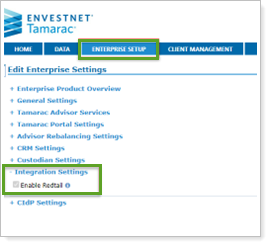
This will activate Single Sign-on (SSO) and allow the user to control the Redtail file export feature.
Access Redtail from Tamarac Reporting
Single sign-on (SSO) allows seamless access to Redtail without requiring you to sign in directly to the Redtail system. The first time you use it, you will be prompted to sign in to your Redtail account for authentication. After the initial authentication, subsequent SSO access will not require re-entering your credentials.
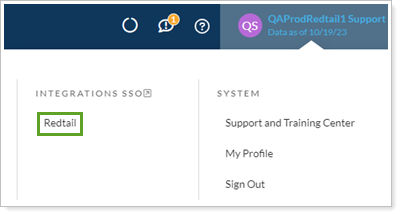
To access, under your user profile, in Integrations SSO, select Redtail.
Sync Tamarac Data With Redtail Records - excluded per Reed Roy-Byrne 5/16/25
Tamarac can generate an accounts and holdings file and export it to an FTP site. Redtail can retrieve this file on your behalf and use it to keep Redtail records up to date with Tamarac data.
This option is not turned on by default. You must enable it if you want to sync Tamarac data with Redtail.
IMPORTANT Note
- Once enabled, Tamarac will automatically generate and post the daily file.
- Redtail does not retrieve the file automatically. To retrieve the Tamarac data, contact Redtail support to open a service ticket and ask that they connect the Tamarac file to your Redtail account.
- Before Redtail can process the file, you must complete the single sign-on (SSO) process.
Enable Data Sync From Tamarac to Redtail
To enable data export to Redtail:
-
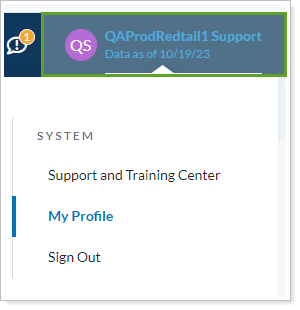
In Tamarac Reporting, select your username.
-
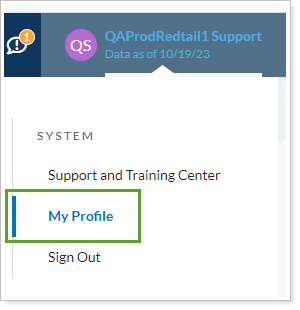
Select My Profile.
-
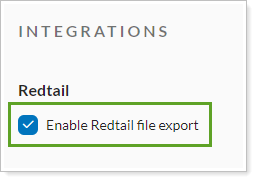
Under Integrations, select Enable Redtail file export.
File Contents
The file contains the following information:
-
Account Number
-
Account Name
-
Account Title
-
Symbol
-
CUSIP
-
Security Name
-
Security Type
-
Balance Date
-
Quantity
-
Quantity Date
-
Price
-
Price Date
-
Balance