
Contents
|
Launch MoneyGuide from the dashboard Switch between accounts on the MoneyGuide dashboard Available MoneyGuide dashboard pages |
The MoneyGuide Dashboard
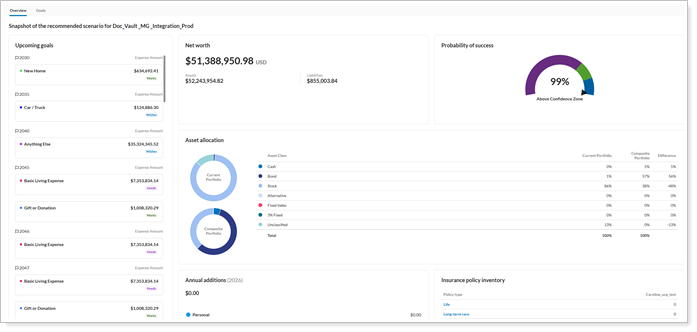
The MoneyGuide Dashboard brings key financial planning data directly into Tamarac, helping you view and manage client plans without switching between applications. Use the dashboard to review net worth, asset allocation, probability of success, funded status, and other plan insights, as well as launch MoneyGuide when you need to make updates or continue planning activities.
View the MoneyGuide dashboard
To view the MoneyGuide dashboard:
-
Under Accounts select Households.
-
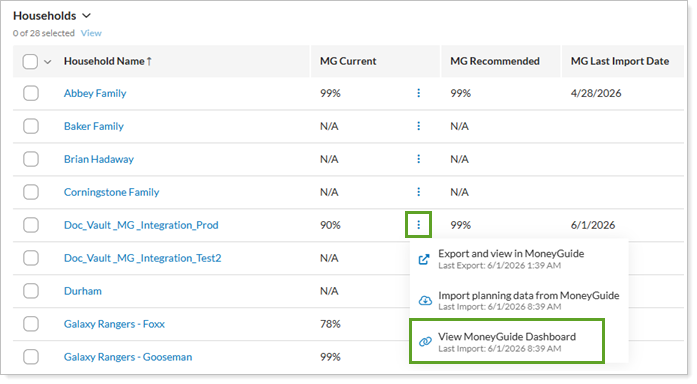
From the Households page, select Actions next to the household and select View MoneyGuide Dashboard
Launch MoneyGuide from the dashboard
To Access MoneyGuide directly, select Launch MoneyGuide from the dashboard.
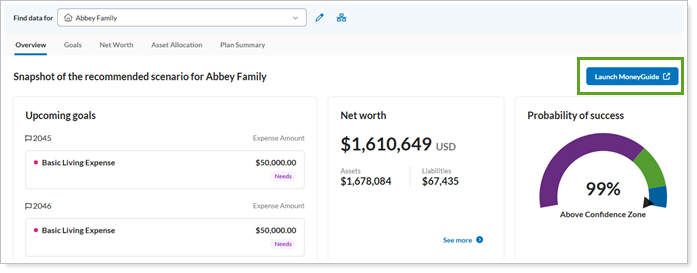
This will open MoneyGuide directly from Tamarac where you can view an existing plan or start a new one.
Switch between accounts on the MoneyGuide dashboard
To switch between households on the dashboard. Use the Find Data For search to search for and switch between households from any MoneyGuide Summary page.

Available MoneyGuide dashboard pages
The MoneyGuide dashboard includes the following pages:
-
Overview
-
Goals
-
Net Worth
-
Asset Allocation
-
Plan Summary
Notes
Your firm must have the MoneyGuide integration enabled to see these pages.
MoneyGuide Overview page
For firms that use MoneyGuide integration, the Overview page is the starting point for MoneyGuide in Tamarac. It brings together key plan details so you can more quickly review a client’s financial position.
From this page, you can:
-
View the probability of success.
-
Review household and plan details.
-
Open the full MoneyGuide plan through single sign-on (SSO).
-
Go to pages like Goals and Net Worth.
The page also helps you identify missing data, like when a household doesn’t have a plan, an account isn’t linked to a household, or plan data isn’t available. Tamarac receives plan data in real time from MoneyGuide. This gives you faster access to important plan information in Tamarac.
MoneyGuide Goals page
For firms that use the MoneyGuide integration, you can view a client’s financial planning goals in Tamarac Reporting on the Goals page. The page shows goal data in real time, including funding status, amounts, time horizon, and priority. Tamarac Reporting also shows clear messages when goal data is unavailable, such as when a household has no plan with goals, an account is not part of a household, or goal data is missing, incomplete, or unavailable.
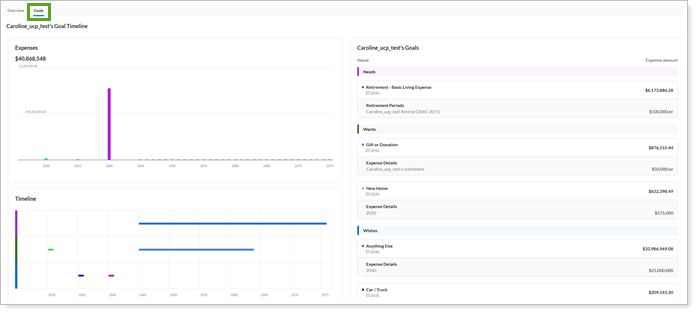
To access the Goals page, select the Goals tab from the MoneyGuide dashboard.
MoneyGuide Net Worth page
For firms that use the MoneyGuide integration, you can view View a consolidated summary of a client's assets, liabilities, and net worth over time.
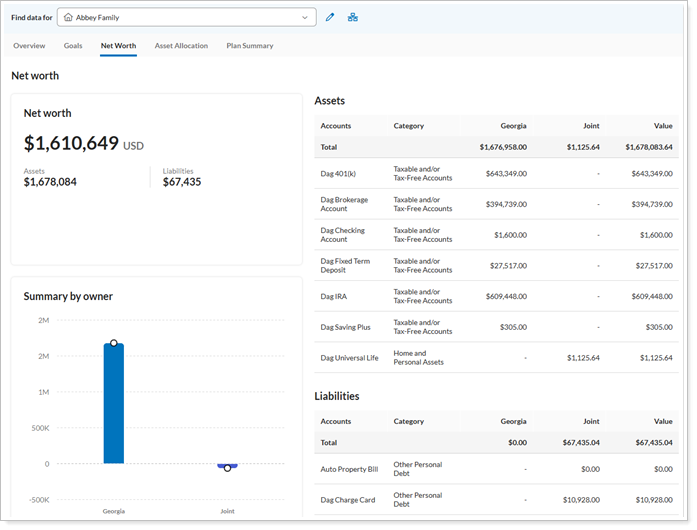
To access the Goals page, select the Net Worth tab from the MoneyGuide dashboard.
MoneyGuide Asset Allocation page
For firms that use the MoneyGuide integration, you can review interactive views of current and target allocations, including variances across asset classes based on MoneyGuide data.
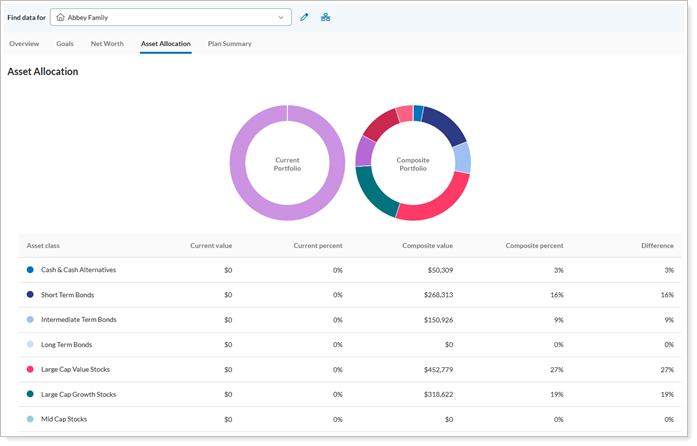
To access the Goals page, select the Asset Allocation tab from the MoneyGuide dashboard.
MoneyGuide Plan Summary page
For firms that use the MoneyGuide integration, you can See key plan metrics in one place, including probability of success, funded status, and major goal coverage.
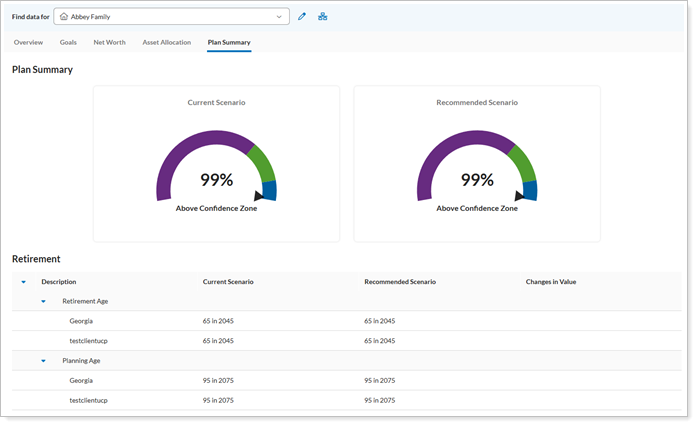
To access the Goals page, select the Plan Summary tab from the MoneyGuide dashboard.