
Contents
Manage liquidity more precisely with security reserves
As an advisor, you need a way to keep client assets invested while still meeting liquidity needs. Previously, this often meant relying only on cash reserves and sometimes holding secondary cash positions like traded money market funds.
Security reserves introduce a new way to manage your client’s liquidity needs with precision, dialing in the preferred values of sweep cash and other traded securities. In most cases, you’ll use traded money market funds, but you can also use mutual funds, equities, ETFs, and fixed income securities.
You set a security reserve goal amount and thresholds, the same as you would a cash reserve. The difference here is this feature allows Tamarac Trading to intelligently sell from the security reserve to the extent of the lower threshold to fund sweep cash before selling from the rest of the portfolio. Any amount above the reserve goal continues to behave like a normal holding and remains available for trading, modeling, and funding directed trades. After this release, you can start using security reserves at any time. You’ll see and work with them in the following locations in Tamarac Trading:
-
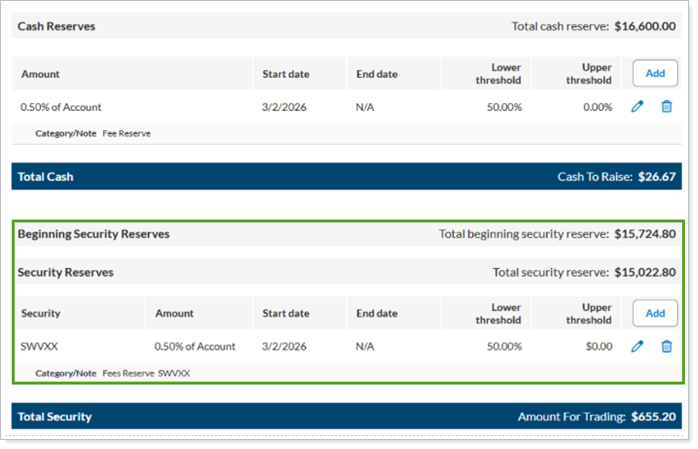
Rebalancing settings. Set up Security Reserves next to Cash Reserves in the Cash Management settings of an account.
-
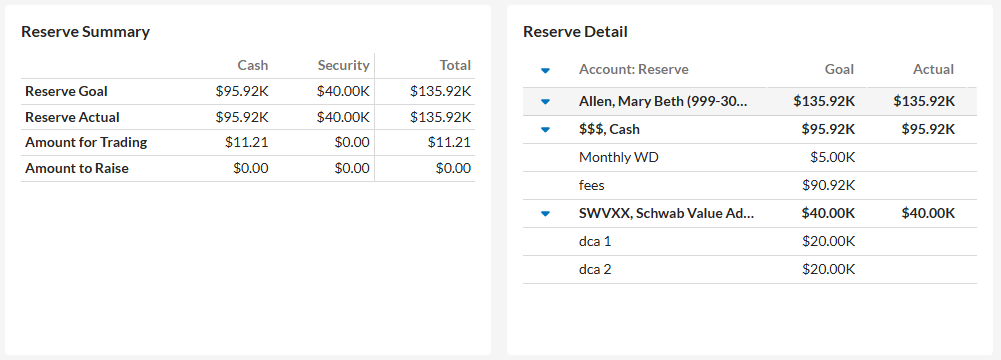
Rebalance Summary report. See combined cash and security reserve goals and values in the Reserve Summary and Reserve Detail widgets. If the account is rebalanced, we show the post rebalance values.
-
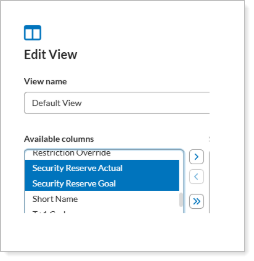
Rebalance page. View real-time security reserve balances against goal amounts on the Rebalance page in the new columns Security Reserve Actual and Security Reserve Goal.
-
Grids and trade reviews. When you set a security as a reserve in an account, we’ll show that in the security description.

-
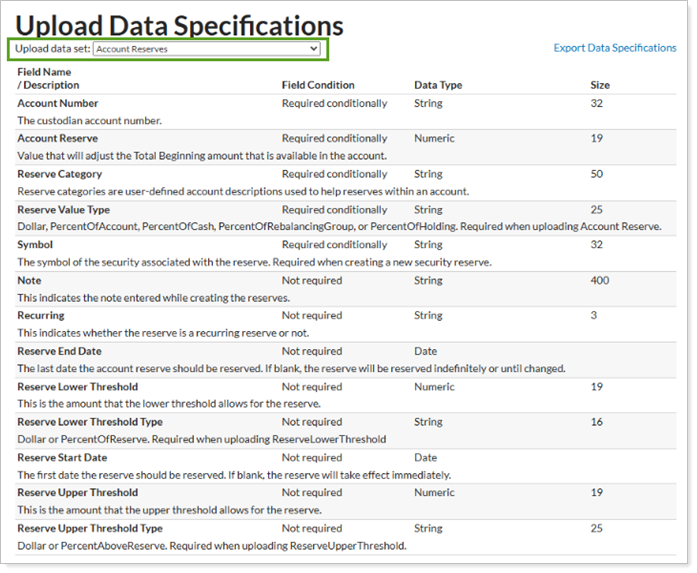
Bulk Uploads. We’ve expanded the former Cash Reserves upload data set to an Account Reserves data set, allowing you to upload cash and security reserves at the same time. If you don’t provide a security symbol, Tamarac automatically creates a cash reserve. All headers are backward compatibility with existing files.
-
And more.
The following types of accounts won't support security reserves:
-
Accounts using native Tamarac sleeve trading and reporting.
-
Envestnet-managed (TUMA) accounts when Envestnet trading is enabled.
For more information and examples, when the feature is released, see Security Reserves.