
New Tamarac Trading Dashboard Now Available
For those of you who use Tamarac Reporting, you know how useful and convenient the reporting dashboard can be. It gives you a heads-up display and quick access to the data most important to you. We're pleased to announce that we've added a dashboard for your convenience: the Tamarac Trading dashboard.
This dashboard provides a quick snapshot of relevant trading data. You can customize the dashboard further to include or exclude certain details, add direct page links, and filter results by saved search or account set.
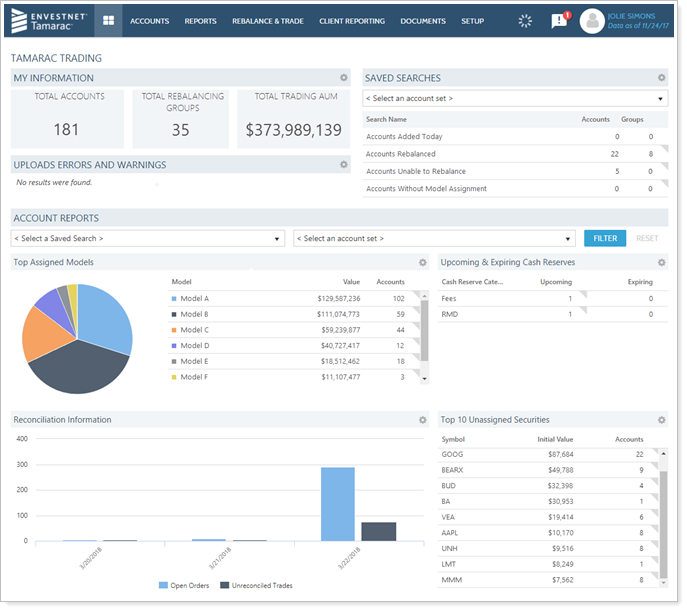
The dashboard includes these customizable widgets for your convenience:
-
My InformationSee a quick overview of your business, including the number of trading accounts, groups enabled for rebalancing, and trading AUM.
-
Saved SearchesAdd saved searches to your dashboard and directly link them to pages in Tamarac Trading, allowing you to take quick action on important saved searches.
-
Upload Errors and WarningsView and customize a list of current upload errors. Click the data set link to go directly to the Upload Status page for more information or to resolve errors.
-
Models & CategoriesSee high-level details about your models, such as top assigned models or allocation to top asset classes. You can also show your categories such as asset class, sector, security type, and more, depending on your needs.
-
Upcoming & Expiring Cash ReservesSee an overview of any upcoming and expiring cash reserves in clients' accounts at a glance.
-
Reconciliation InformationReview a bar chart of logged orders and recent trades that haven't yet been reconciled for the time period you specify.
-
SecuritiesView the top 10 or top 20 unassigned or assigned securities and customize the columns you see in the chart.
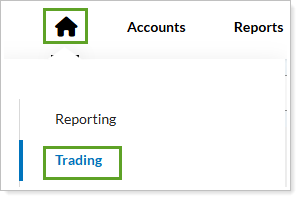
To access the Tamarac Trading dashboard, select Tamarac Trading when you click on the dashboard icon.
Trade Review Now Available to Review Trades Across Accounts
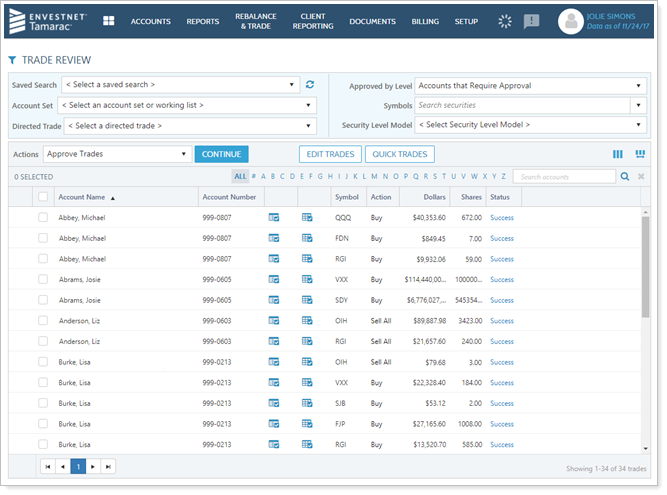
The Trade Review page provides a high-level way to see and review trades across multiple accounts. With this page, you can focus on the impact of your trades, edit trades, group your view to better analyze recommended trades, and more.
This page is now available in the Rebalance & Trade menu.
New Trade Files Available for Raymond James
We've added two new trade files, the Raymond James COE Equity and the Raymond James COE Mutual fund trade files. We added these additional trade files to interact with the new Raymond James trading system, and these trade files give you additional options for trading equities and mutual funds.
You can enable this trade file on the System Settings page, under Trade File Settings. Once enabled, you can choose this new trade file on the Account Settings page, under the Account Configuration tab.