
Contents
|
Beta Rebalance Summary Report Updates Select the Lots You Want to Trade Use Improved View Options to Customize the Report See At-a-Glance Information With Two New Widgets |
Beta Rebalance Summary Report Updates
Important
The new Rebalance and Rebalance Summary pages are only available as beta test pages right now. By releasing beta pages, we can take advantage of more frequent releases to get more features out to you faster. Final features may change from these descriptions. Track updates here: Tamarac Trading Beta Pages - Summary Release Notes.
Select the Lots You Want to Trade
https://envestnet.atlassian.net/browse/TFF-4745
On the current version of the Trade Summary, you may be aware that you can pick specific lots of a security to sell. With this release, we're bringing this feature to the Rebalance Summary report. Now, when generating a custom strategy, you can choose Sell Lots.
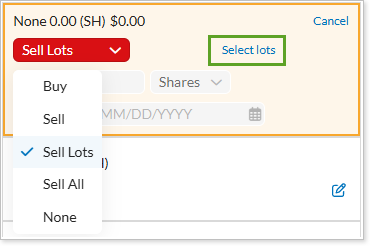
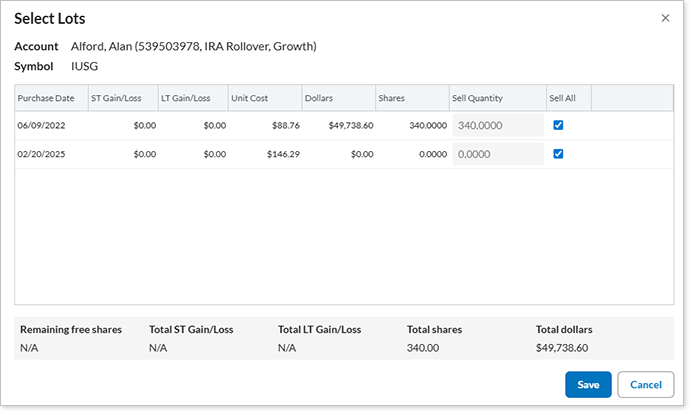
Next, if you click Select Lots, you have access to the lot information for this holding. You can choose lots to sell, define a specific number and lot to sell, or sell all of a certain lot.
Notable difference from current functionality: whenever you are trying to do a quick trade, if you've already selected lots or the MDA has selected lots (like in tax lost harvesting), you cannot add that account and symbol to quick trades popup; as of now, you'll get a warning telling you that you can't do it; warning will tell you to go back to regular workflow
Josh thinks this won't happen in December major release
Dev19 (not fully in there, but you can get popup and select lots)
Cash box updates when changing lots
For model-specific custom strategies, users cannot change the quantity of the sell already recommended on the rebalance summary. Flesh this out in more detail with Nate.
Select Lots link appears on the recommended trade square on the grid. When clicked, the Select Lots popup appears and lets you choose which lots you want to sell.
Can't do this for sleeve accounts
Children of ownership accounts can't do this, either
Use Improved View Options to Customize the Report
As we continue to add features to make the Rebalance Summary report easier to read, with more filtering features to help you drill down to the data you want to see, we've added new features to improve how you group and filter the report.
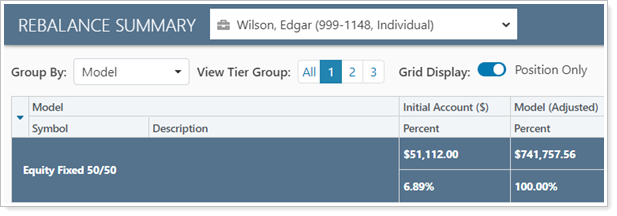
Along with the current viewing options View Tier Group and Grid Display, you can now use these additional features:
-
Group By.In this list, choose how you want to group the report. You can group by model, security type, asset class, and other security categories. This allows you to view trades in the context of models or security categories.

-
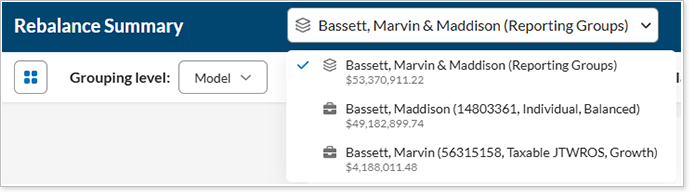
Switch Accounts Within a Group.When viewing a group or an account within a group, you can use this list at the top of the Rebalance Summary to view the group or accounts within the group. An icon lets you know if you're selecting an account (
 ) or a group (
 ).
). 
See At-a-Glance Information With Two New Widgets
We added two new widgets to the Rebalance Summary report.
Account Activities
https://envestnet.atlassian.net/browse/TFF-5303
With the Account Activities widget, you'll get a heads-up view of recent activities in the account.
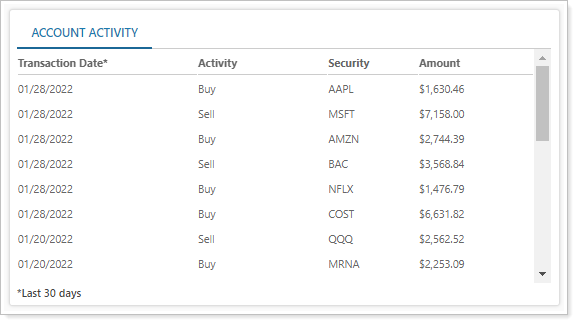
You'll see any of the following activities that happened in the past 30 days:
- Buys
- Sells
- Receipt of securities
- Transfer of securities
- Deposits
- Withdrawals
YTD Realized Gain/Loss
https://envestnet.atlassian.net/browse/TFF-4997
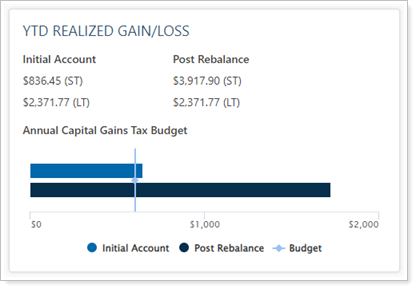
To help you get an at-a-glance view of the information you'll need for tax-aware trading, we added the YTD Realized Gain/Loss widget. You'll see the following details on this widget:
-
Initial and post-rebalance realized gain and loss amounts when viewing a taxable account or a group that contains at least one taxable account.
-
A bar chart of positive capital gains values compared to the value entered in the Annual Capital Gains Tax Budget setting. This chart gives you an at-a-glance view of realized capital gains and how those will be affected by a rebalance .
Beta Rebalance Page Updates
New Tool to Refresh Page Data
We added a new tool to the Rebalance page that makes it easy to refresh the data on the page and see how current the data is. In cases where there is more than one person working on the Rebalance page, a user on the page may wonder how old the data is or if there are changes they haven't seen yet.
Click the  button to refresh the data on the page. Hover the button to see how long it's been since you've refreshed the data.
If it's been five or more minutes since the page data has been refreshed, the tool will let you know:
Get Custodian Values
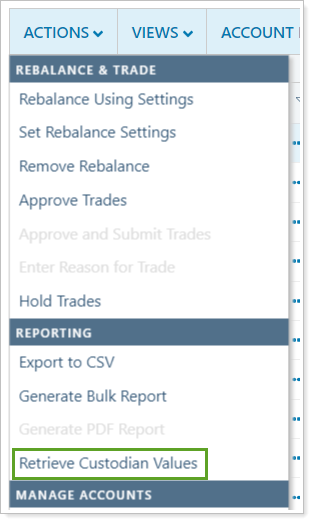
We added the Retrieve Custodian Values action on the beta version of the Rebalance Page. If you use an applicable custodian integration, choosing this option will refresh custodian data columns.
You can now view these columns:
- Custodian Values Last Updated
- Custodian Value
- Custodian Value Difference
- Custodian Net Cash
- Custodian Cash Difference
- Custodian Value Difference
POPUP WINDOW IS DIFFERENT, SO UPDATE UI FOR THAT
If your firm has the appropriate custodian integration enabled, you can see custodian data on the Rebalance page.
To refresh custodian data, select Retrieve Custodian Values on the Actions menu.
Account Notes on Rebalance Page and Rebalance Summary Report
https://envestnet.atlassian.net/browse/TUNB-4373
Platform Improvements & Performance Enhancements
Part of our ongoing effort to improve the speed and reliability of the Tamarac Platform includes a number of enhancements under the hood. This table highlights improvement made since our last release:
| improvement made | type of improvement |
|---|---|
| We updated load balancing capabilities to help balance and improve data calculations and processing time. This improvement reduced the amount of time required to process some calculations by 25%. | Code/Database |
|
https://envestnet.atlassian.net/browse/TIP-933 We further optimized the export stage of the morning sync process,. This faster sync process can mean data is available to you earlier, potentially reducing morning sync times by up to 10 to 15 minutes for some firms. |
Code/Database |
|
https://envestnet.atlassian.net/browse/TTENG-531 We improved the morning process duration to prevent bottlenecks and improve the way this data is processed. This change allows difference processing steps to be done concurrently rather than one after another. Because of this improvement, you may experience improved performance in the speed at which morning rebalancing data is processed. |
Code/Database, Tamarac Trading |
|
https://envestnet.atlassian.net/browse/TUNB-4700 We updated the way our servers cache and retrieve data for the beta version of the Rebalance page. Because of this, you may see improved performance when searching and sorting on that page. |
Code/Database, Tamarac Trading |
| We're updating Portfolio Center to version 5.20 soon. This upgrade will mean substantial performance improvements for some users. While every firm is different and has different data characteristics, some test scenarios suggest that some firms may experience anywhere from a 20% to 75% reduction in the time it takes to process transactions in Portfolio Center. | PortfolioCenter |
| TFF-5504 (widget responsiveness) |
Learn More - Watch the Release Video