
Contents
|
Rebalance Tab Loads by Default From the Rebalance Page |
Rebalance Page Updates
Rebalance Tab Loads by Default From the Rebalance Page
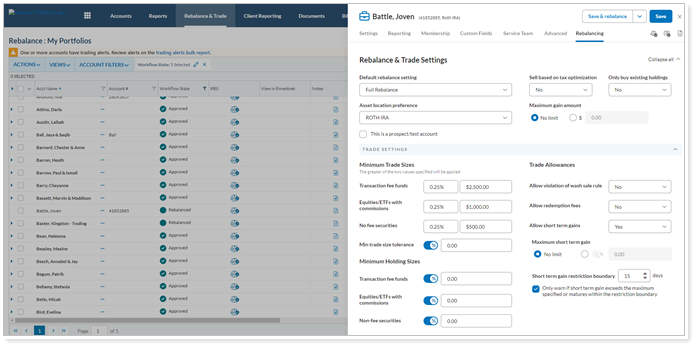
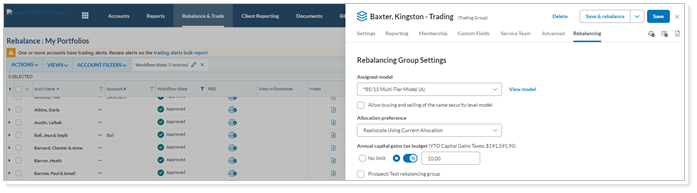
We know how important the Rebalance page is to you and your business. Typically, when you open Account Settings on the Rebalance page, you are adjusting a Rebalancing Account setting. To streamline your process, after this release, you’ll see the Rebalance tab load as the default option when you open Account Settings from the Rebalance page. This enhancement will apply to Accounts and Rebalancing groups.
Single Account
Group Account
Add Deviations as a Category Type on the Rebalance Page
Note
This feature will be available on June 22, 2023.
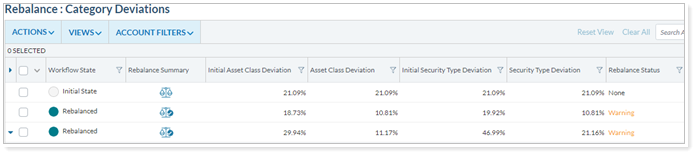
Recognizing the importance of aligning with your client’s goals, we understand that maintaining alignment is crucial. That's why we have listened to your feedback and developed a powerful solution that provides more control and flexibility. With this release, you can now use Deviations as a category type. You will now have a comprehensive view of your clients' portfolios, allowing you to identify and address any deviations from their desired asset allocation.
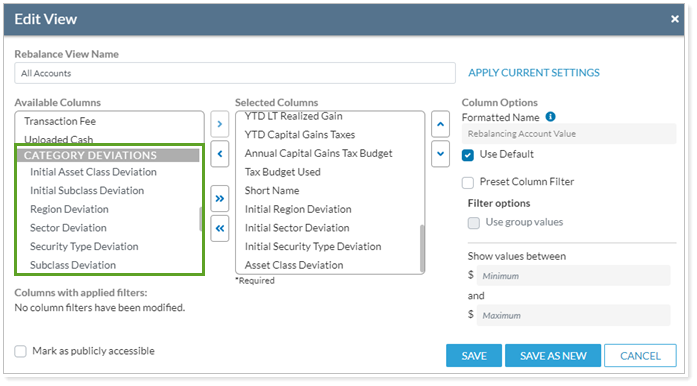
This enhancement will allow you to quickly search for accounts with deviations out of tolerance as targets for rebalancing.
Improvements to the Rebalance Summary Based on Your Feedback
We heard your feedback and made some smaller improvements to the Rebalance Summary to make it easier to use:
-
Drop-down list.At the top of the report, you can switch between individual accounts and groups using a drop-down list. We improved the list so that it expands to accommodate longer account or group names. This helps you see which account or group you're viewing and reduces confusion when there are several accounts with similar names.
-
Scroll within the cash information box.In some cases, especially when viewing the report for a group, the cash information on the right side of the report can be long. We added the ability to scroll within the cash information box, so you won't have to scroll through the entire report in order to view all of the cash information.
-
Scroll the report when generating a quick trade.When you generate a quick trade, a pop-up appears so you can create the trade. We heard that some of you want to continue to view the report behind the window, so we added the ability to scroll while you're creating a quick trade.
-
Filter quick trades by model.We added a filter to the quick trades pop-up that lets you filter on an individual model. When you apply this filter and then search for a security, your search is limited to the securities within that model or any alternate security sets associated with that model. This makes it easier to find the security you're looking for.
[INSERT SCREENSHOT]
Learn More - Watch the Release Video