
Contents
************************************ Template: ************************************
Feature or Product Name
Descriptive title for note: Create notes in accounts / Onboard clients more quickly with Schwab integration / See [thing] in [location] / etc.
What's changing
Text describing how it was before and how it will change after the release. Give a plausible, relatable scenario for how it used to be so users can relate. Include screenshots whenever possible.
As an advisor, you...
When rebalancing trades, you need to...
In the past, [...insert description of current/past behavior]. With this release, [insert description of change]...
We heard your feedback and we've introduced... (this tends to be very easy to overuse, so avoid it unless you're really desperate.)
Why you'd use it
At least one sentence on the benefit(s) of the change. Here are a few common ways:
This enhancement streamlines your processes by...
The new [feature name] simplifies your workflows by...
Save time...
Increase efficiency....
Reduce errors...
Communicate with clients more clearly...
Customize the [platform] to align with your [clients' needs, firm's branding, etc.]...
How to get started
Choose from one of the snippets below, or add your own text if there are specific steps.
No action is needed. These changes will apply after the release.
You must have the [XXXXXX] integration enabled to see this change.
To get started with [xxxxx description/name of feature], contact your Tamarac Account Management team.
To access the [X], [do Y step(s)]. <--If using this, it should be one sentence with up to 3 steps in it. More than that, link to a step page. Actually, link to the step page no matter what.
Example:
To access Report Studio, under Reports, select Report Studio.
[Screenshot]
Create new modules in under Modules.
[Screenshot]
Additional information
ALWAYS include at least one link to a related/supporting Help Center page. It doesn't have to be new, but we shouldn't leave 'em hanging. Can exclude this section until the links go live, if needed.
For more information, see [insert link here]
For more information, see:
-
Link to page 1
-
Link to page 2
************************************ Examples ************************************
Sandwich bar
Choose from more bread options
What's changing
As an advisor, you need to feed your clients when they are in your office and get hungry. But in the past, the sandwich bar offered only white bread. This didn't work well for clients who couldn't eat gluten or just preferred wheat bread. That's why, with this release, the sandwich bar now offers the following new bread options, in addition to the standard white bread:
-
Wheat
-
Pita
-
Lettuce wrap
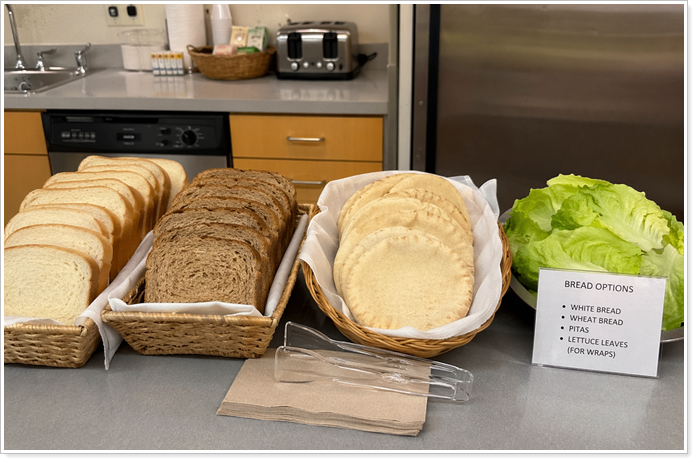
Why you'd use it
These expanded options not only support a wider variety of dietary needs, but they offer variety to everyone who eats at the salad bar. You and your clients will look forward to lunch a little more with these expanded offerings.
How to get started
No action is needed. These changes will apply after the release.
Additional information
For more information about the sandwich bar, see Introduction to the sandwich bar.
New utensils for certain lunch types
What's changing
The sandwich bar offers far more than just sandwiches. It also offers a variety of food offerings from around the world. In the past, we offered only Western-style fork, knife, and spoon. We heard your feedback, and with this release, you'll have a choice of chopsticks and soup spoons when you order a meal eligible for those utensil types.
Why you'd use it
This change allows eaters to use their preferred utensils, enhancing the overall lunch experience.
How to get started
You must be on an Executive meal plan and order a meal that is eligible for alternate utensils. If configured, you'll be offered the alternate utensils by default when you order an eligible meal.
For information about the Executive plan, contact your Support team.
Additional information
For information about meal plans, see XXXXX.
For information about which meals are eligible for which utensils, see YYYY.
************************************ Optional other items that appear in RN pages sometimes ************************************
Platform Improvements and Performance Enhancements
| improvement made | type of improvement |
|---|---|
| We improved the way we get realized gains and losses information from custodian partners into Tamarac. Now, the process is faster, allowing you to see the data sooner in the day. | Data |