
Contents
|
Manage cash with cash & security reserves Security reserves and security restrictions |
Introduction
Security reserves allow you to precisely manage your client’s liquidity needs, dialing in the preferred values of sweep cash and other traded securities. In most cases, you’ll use traded money market funds, but you can also use mutual funds, equities, ETFs, and fixed income securities.
You may choose to create security reserves for one-time or recurring cash needs like Required Minimum Distributions (RMDs), DCA security purchases, management fees, taxes, or client expenses.
Security reserves allow you to:
-
Keep more assets invested while still meeting known or recurring cash needs.
-
Automate cash funding during rebalances by selling reserves before touching the broader portfolio.
-
Provide precise liquidity control with goal amounts and thresholds.
Help Video: Security Reserves
In this short video, you'll learn about how to use the Security Reserves feature to manage liquidity needs.
How it works
You set a security reserve goal amount and thresholds in an account, the same as you would a cash reserve. When rebalancing a whole account, Tamarac Trading funds sweep cash by first selling from the security reserve to the extent of the lower threshold. Then it sells from the rest of the portfolio. Only the amount up to the reserve goal is protected. Any amount above the reserve goal acts like a normal holding. It remains available for trading, modeling, and funding directed trades.
The existence of a security reserve in an account won’t trigger a raise cash event. It’s evaluated and adjusted when you rebalance the whole account. If reserve thresholds can’t satisfy sweep cash needs, Tamarac Trading recommends sells from the broader portfolio.
When working with security reserves, be aware of the following conditions:
| CONDItion | DESCRIPTION |
|---|---|
| Overall account rebalancing value is reduced. | Security reserves reduce the overall account rebalancing value by the dollar amount of the security reserve. |
| One security allowed per account. | All security reserves for an account must reference the same security symbol. |
| No cash substitutes. | For a given account, you can set cash substitutes or security reserves, not both. |
| Unique category names required. | You can use a reserve category once per account. You can’t use the same category as both a cash reserve and a security reserve. |
| Use of securities under reserve in models. | You can hold a security symbol in the model that’s also a security reserve in the account. Tamarac Trading treats the amount held above the reserve goal just like any other security. |
| Eligible security types. |
In most cases, you’ll use traded money market funds, but you can also use mutual funds, equities, ETFs, and fixed income securities. |
| Trading precision varies by security type. |
A reserve security you select may trade in shares. In this case, Tamarac Trading may take the following actions:
This is expected behavior and may cause the reserved amount to exceed the exact reserve goal value. |
| Eligible trading tools. | The whole account rebalance considers security reserves. You can also designate the security reserve symbol as a funding source for directed trades. You can also target them in models. |
| Use of security restrictions. | Most security restriction behaviors work with security reserves. For a list, see the section Security reserves and security restrictions. |
| Eligible account types. |
You can’t set security reserves in the following account types:
|
| Configure security reserves directly on accounts. | You must set up security reserves directly in each client account. You can’t automatically apply security reserves from an account template. |
Manage cash with cash & security reserves
On a client account, you can set cash reserves, security reserves, or both. Using them together as a two‑layer liquidity strategy looks like this:
- Cash reserves define the minimum sweep cash the client must have available for known or recurring cash needs.
-
Security reserves hold tradable securities that remain invested until sweep cash needs to be replenished.
This approach keeps more assets invested while still ensuring cash obligations are met.
Here’s the typical flow when both are present:
-
You set a cash reserve goal to define how much sweep cash an account should maintain.
-
You set a security reserve goal to hold excess liquidity in an invested form.
-
When rebalancing a whole account, Tamarac Trading will:
a. First try to meet the cash reserve.
b. If sweep cash is short, sell from the security reserve first, down to the security reserve’s lower threshold.
c. When meeting the cash reserve and selling the security reserve don’t raise enough cash, propose sells for other portfolio positions.
Security reserves and security restrictions
In Tamarac Trading, security reserves work with the following security restriction behaviors during rebalancing:
- Hold. Trading won't propose trades for the security reserve symbol.
-
Buy only. Trading may propose a buy of the security to fund the security reserve, but it won’t propose a sell to fund sweep cash or the portfolio.
-
Sell only. Trading may propose a sell of the security if the security reserve threshold is exceeded. Trading may propose a sell of the security down to the lower threshold to meet cash and portfolio needs.
-
Range to hold. Trading may propose a buy of the security to fund the security reserve, then respect the range to hold once the security reserve is filled. Trading won’t propose a sell to fund sweep cash or the portfolio.
Security reserves don’t work with the following restriction types:
- Unmanaged
- Wash sale
For more information about security restrictions, see Security Restrictions.
Security reserves throughout Tamarac Trading
You can see or interact with security reserves in throughout in Tamarac:
- Cash Management.
- Rebalancing.
- Manual trades.
- Reports like the Rebalance Summary report.
- Grids and trade review experiences.
- Bulk reports.
- Uploads.
- Rebalancing settings.
Cash Management
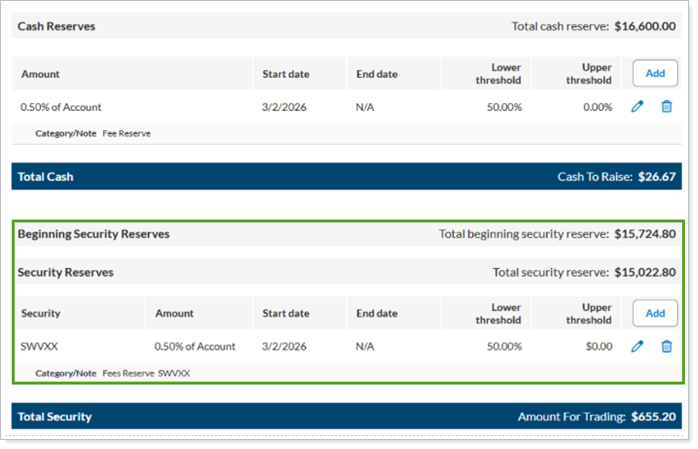
You set up security reserves in the Cash Management settings of an account.
Rebalance
To get you a fuller picture of your reserves during the rebalance process, view cash and security reserve amounts on the Rebalance Summary.
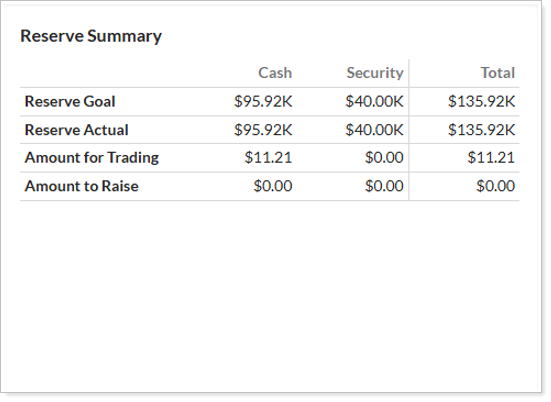
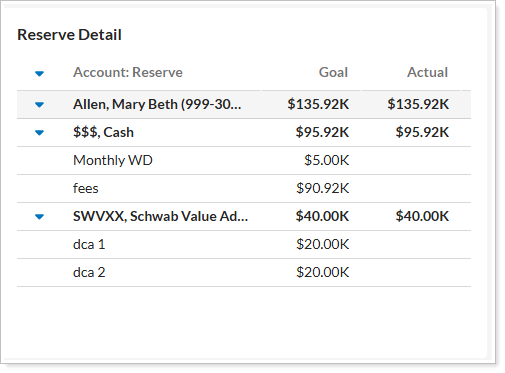
The Rebalance Summary report shows reserve information in the spreadsheet view and in the Reserve Summary and Reserve Detail widgets.
reserve summary Widget
The Reserve Summary widget shows an at-a-glance view of valuable cash information you'll need to consider such as reserve goals, cash available to trade, and the cash amount to raise.
Reserve Detail Widget
The Reserve Detail widget gives you insights into the reserves set for the account you're viewing. Cash reserves are displayed as $$$. Security reserves appear with their security symbol.
spreadsheet view
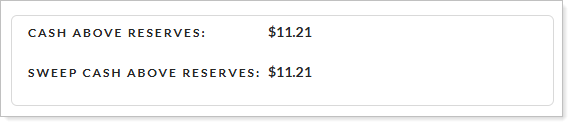
The reserves information section in the Spreadsheet View of the Rebalance Summary gives you the status of your cash reserves.
grids and trade review experiences
When you set a security as a reserve in an account, it appears in the security description.

When an account is configured with a security reserve, the security symbol behaves as follows in the grid:
- A row will always be present, even if the account does not hold that security and does not have a target for that security. Select to expand the security messages to see the total holding value in a security reserve symbol.
-
The Symbol/Description ends with the tag (SECURITY RESERVE).
-
The row will always contain a comment stating that the symbol is a security reserve security for the account.
-
The Initial Shares/Dollars/Percent columns are reduced by the number of shares held in a security reserve.
-
The Post-Rebalance Shares/Dollars/Percent columns show the amount after factoring for security reserves.
Manual Trading
To perform manual trading for accounts with security reserves, use the following actions.
| action | BUY | sell |
|---|---|---|
| Custom Strategy | Yes | Yes, for the amount over the reserve goal. |
| Sell lots | N/A | Yes, for the amount over the reserve goal. |
| Quick Trade | Yes | Yes, for the amount over the reserve goal. |
| Directed Trade |
Yes You can also sweep excess cash into the security reserve. We recommend a directed trade Buy % of Cash. |
Yes, for the amount over the reserve goal. |
Trading Dashboard
On the Trading Dashboard, the Upcoming & Expiring Reserves widget shows a list of all upcoming or expiring account reserves, along with their corresponding categories, for the date range you specify.
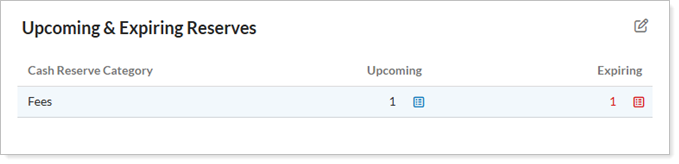
For more information on this widget, see Upcoming & Expiring Reserves Dashboard Widget.
Bulk Reports
You can create a bulk report for Account Reserves to obtain information on cash and security reserves in client accounts.
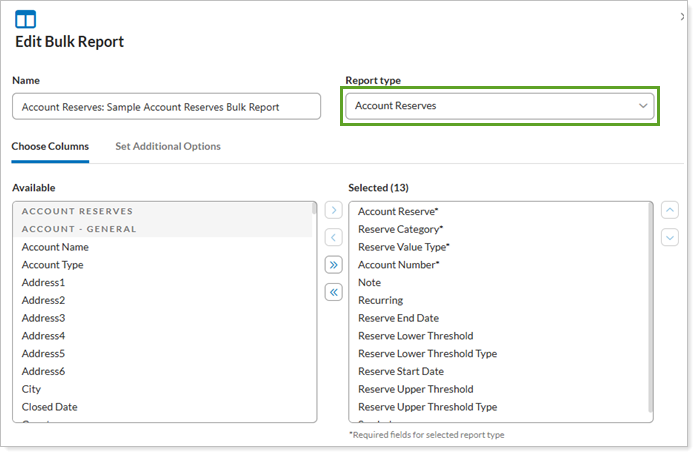
For more information about bulk reports in Tamarac, see Understanding Bulk Data Exports.
Uploads
In Upload Data Specifications, the Account Reserves data set allows you to upload cash and security reserves at the same time. If you don’t provide a security symbol, Tamarac automatically creates a cash reserve. All headers work with existing files.
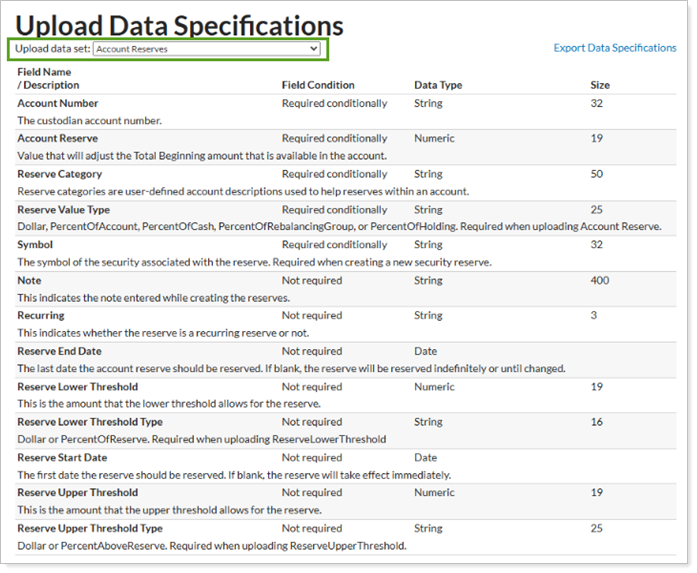
For more information about Uploading data in Tamarac, see Understanding Bulk Data Uploads.
Rebalancing Settings
Use the Only warn if reserves cannot be met option to control how Tamarac Trading behaves when cash and security reserves can’t be met.
Your options are:
- Selected. Tamarac Trading only warns you during a rebalance if cash and security reserves cannot be met, but you can proceed with the rebalance.
- Cleared. Tamarac Trading prevents a rebalance if reserves cannot be met.
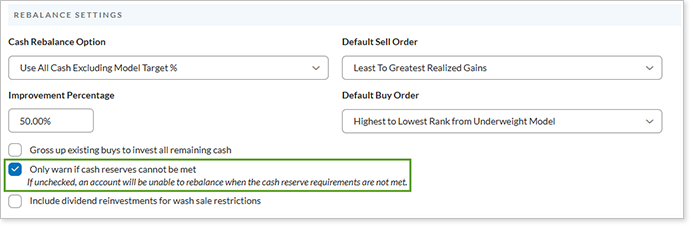
For more information on this setting, see Rebalance Settings.
Create a security reserve
To add a security reserve, follow these steps:
-
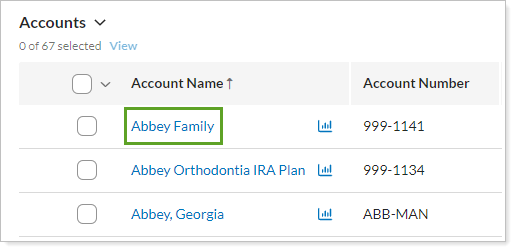
Under Accounts, select Accounts.
-
Select the account where you want to add a security reserve.
-
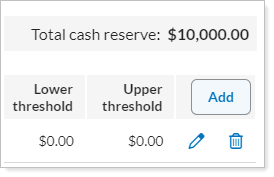
In the Rebalancing tab, select Cash Management.
-
In the Security Reserves section, select Add.
-
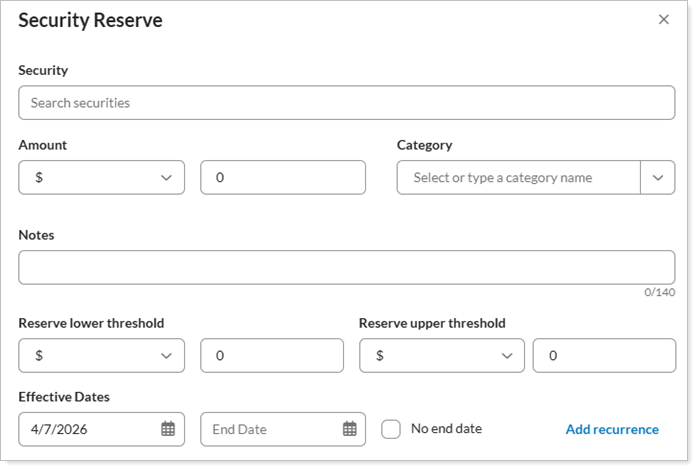
In Security Reserve, complete the following information. For details on how to complete each field, see Security Reserves Settings (Accounts).
Use case examples
Following are typical use cases for security reserves.
example 1: fees and trade buffer
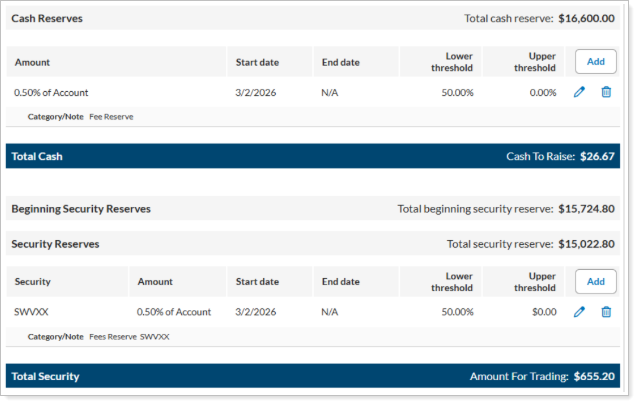
You’d like to set a 1% reserve for fees and a trade buffer split between sweep cash and a money market fund with symbol SWVXX.
Add a cash reserve for half of the reserve amount. Then add a security reserve with your desired money market security symbol for the other half of the reserve amount.
example 2: monthly withdrawal
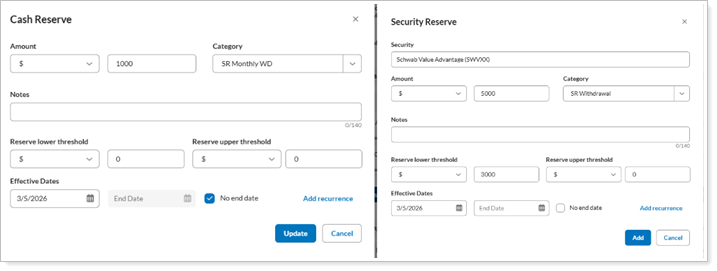
A client has $1,000 withdrawal on the 15th of every month. Together, you decide to set up a maximum of $6,000 in cash sweep and security reserves, with a $3,000 lower threshold.
Add a cash reserve for the portion that is going out of the portfolio. Then add a security reserve for the portion you want to keep for liquidity needs.
The workflow will be:
-
The $1,000 monthly withdrawal goes out, triggering a need to raise sweep cash.
-
A cash rebalance sells the security reserve until the account has used it up to the extent of the lower threshold, in this case $3,000.
-
If needed, to raise sweep cash or re-fill the security reserve, the system will sell from the portfolio to fill both.
example 3: hold a static reserve in a security
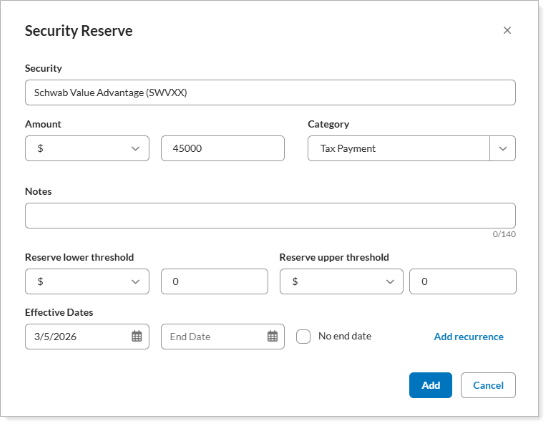
You and your client want to earmark $45,000 for future needs.
Add a security reserve for $45,000 with a Reserve lower threshold of $0.
example 4: dollar cost averaging
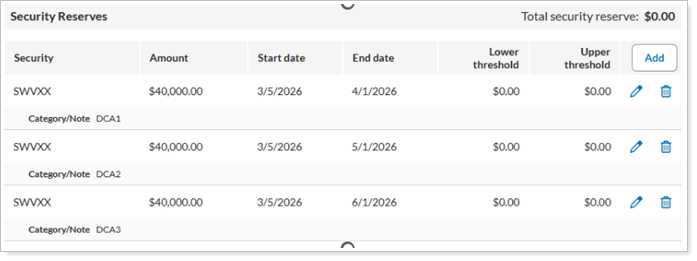
When you and your client want to stage investments over time without leaving excess cash idle, you can use security reserves for dollar cost averaging.
Much like you would with cash reserves, create multiple security reserves using unique category names, each with the appropriate dollar amount and end date.
example 5: security reserves with fidelity accounts
Your client has a Fidelity account and wants $0 in FCASH, opting instead to use the Fidelity cash reserves ticker FDRXX.
Create a security reserve with values you’d typically use for a standard sweep cash reserve.
example 6: security reserves with margin accounts
You've determined that your client wants to keep $0 sweep cash in their taxable accounts which are set up for margin.
Create a security reserve and monitor sweep cash to raise daily. Sell only to raise cash from the portfolio or from the security reserve.