
The Security Reserves section allows you to view, add, edit, and delete security reserves for an account. A security reserve is a tradable security that you designate to cover cash needs for the client. Thise can be for one-time or recurring distributions that you’d withdraw from the account’s sweep cash.
When the account needs to fund sweep cash, with any whole rebalance the platform sells the security reserve to the extent of the lower threshold you specify. If additional sweep cash is required, the platform sells from the portfolio.
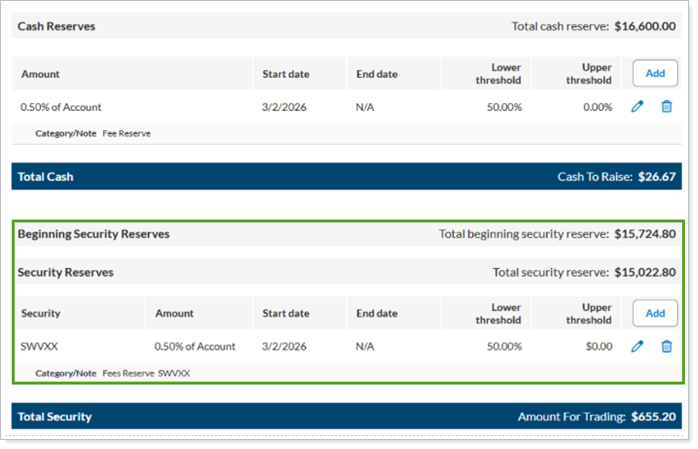
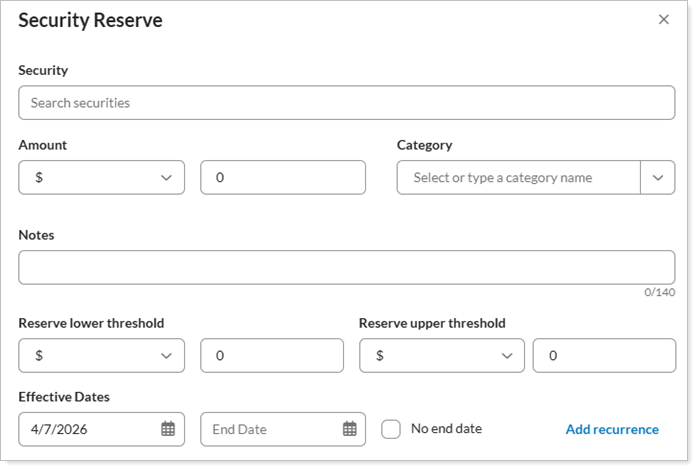
When you select Add, the following options become available. These define how you want the security reserve to behave in the account:
| Setting | More Information |
|---|---|
| Security |
Start typing the security’s name or symbol, and select it from the list. You can use any tradable money market fund, mutual fund, equity, ETF, or fixed income security. You can only use one security per account. |
| Amount |
Designate the amount you want set aside for the security reserve. Select one of the following to designate the amount:
If you choose a share-based security, the platform rounds up to the nearest whole share to calculate the reserve and threshold amounts. Mutual funds have a precision of $1 and equities/ETFs have a precision based on the share price. |
| Category |
Type a classification for this security reserve. You can use a reserve category once per account. You can’t use the same category as both a cash reserve and a security reserve. Categories you've used before will automatically populate in the Category list. Examples may include management fee, quarterly taxes, RMD, DCA. |
| Notes |
Add an optional note to add information for this reserve. For example, you can specify an RMD date or information about a fee change. The note appears here in Cash Management and on the Rebalance Summary report. |
| Reserve lower threshold |
Add an optional lower threshold amount. This is the amount of security reserve that the platform can sell to fund sweep cash. If the Reserve lower threshold is $0, then the platform can sell zero of that position. |
| Reserve upper threshold |
Add an optional upper threshold amount. This amount is the highest acceptable value before the platform will recommend a sell of the security reserve back to the goal. |
| Start |
Enter the date you want the security reserve to begin. Optionally, you can use the calendar feature. The date must be a business day. If you don’t enter a date, the start date will take effect immediately. |
| End | Enter the last date that the security reserve will apply. Optionally, you can use the calendar feature. If you don’t enter a date, the reserve always applies. |
| Add Recurrence |
To support ongoing periodic cash needs for an account, you may choose to set up a recurring security reserve. Select Add Recurrence to create a recurring cash reserve. For the steps to do this, see Add Recurrence. |
The total of all security reserve amounts you’ve added to an account is shown as Total security reserve.
For more information on security reserves, see Security Reserves.